微软 Agent Framework 开发“黄金三角”深度解析:AG-UI、DevUI 与 OpenTelemetry
在 Agentic AI 爆发式发展的时代,我们追求的不只是更强大的模型,更是能让开发者真正睡个好觉的开发体验。过去在本地构建 Agent 时,我们通常会遇到三大挑战:
- 黑盒执行(Black-Box Execution):我的 Agent 到底在想什么?为什么卡住了?(调试困难)
- 交互孤岛(Interaction Silos):Agent 已经做好了,怎么快速给干系人演示一个好看的 UI?(产品化困难)
- 性能盲区(Performance Blind Spots):到底消耗了多少 Token?延迟在哪?(优化困难)
今天我将通过 Microsoft Agent Framework Samples 中的经典案例——GHModel.AI——带你看清一个能精准解决这些痛点的**“黄金三角”**开发栈:DevUI、AG-UI 与 OpenTelemetry。
下面我们来看看,这个强力组合如何覆盖本地开发全生命周期。
第一阶段:创建(Creation)——站在 GitHub Models 的肩膀上
在 GHModel.AI 案例中,我们首先解决的是“Agent 大脑”问题。
传统本地开发经常受限于算力,或被昂贵的 API Key 成本拖慢进度。这个案例很巧妙地利用了 GitHub Models。作为布道者,我必须强烈推荐这个组合:
- 零门槛接入(Zero-Barrier Access):直接用 GitHub 账号调用 GPT-4o、Llama 3 等前沿模型,无需复杂 Azure 配置,也不用绑定信用卡。
- 标准化 SDK(Standardized SDK):借助 Agent Framework 的抽象层,只需少量代码就能切换模型后端。
在这个案例的代码结构里,你会发现 Agent 定义变得非常清晰。不再是杂乱无章的 Python/C# 脚本,而是结构化的“声明式”构建。
Quick Start Code
Python:
# Python - Create Agents with GitModels

from agent_framework.openai import OpenAIChatClient

chat_client = OpenAIChatClient(
    base_url=os.environ.get("GITHUB_ENDPOINT"),    # 🌐 GitHub Models API endpoint
    api_key=os.environ.get("GITHUB_TOKEN"),        # 🔑 Authentication token
    model_id=os.environ.get("GITHUB_MODEL_ID")     # 🎯 Selected AI model
)


# Create Concierge Agent

CONCIERGE_AGENT_NAMES = "Concierge"
CONCIERGE_AGENT_INSTRUCTIONS = """
            You are an are hotel concierge who has opinions about providing the most local and authentic experiences for travelers.
            The goal is to determine if the front desk travel agent has recommended the best non-touristy experience for a traveler.
            If so, state that it is approved.
            If not, provide insight on how to refine the recommendation without using a specific example. """


concierge_agent = chat_client.create_agent(
    instructions=CONCIERGE_AGENT_INSTRUCTIONS,
    name=CONCIERGE_AGENT_NAMES,
)

# Create FrontDesk Agent

FRONTEND_AGENT_NAMES = "FrontDesk"
FRONTEND_AGENT_INSTRUCTIONS = """
            You are a Front Desk Travel Agent with ten years of experience and are known for brevity as you deal with many customers.
            The goal is to provide the best activities and locations for a traveler to visit.
            Only provide a single recommendation per response.
            You're laser focused on the goal at hand.
            Don't waste time with chit chat.
            Consider suggestions when refining an idea.
            """


frontend_agent = chat_client.create_agent(
    instructions=FRONTEND_AGENT_INSTRUCTIONS,
    name=FRONTEND_AGENT_NAMES,
)

# Create Workflow

frontend_executor = AgentExecutor(frontend_agent, id="frontend_agent")
concierge_executor = AgentExecutor(concierge_agent, id="concierge_agent")

workflow = (
WorkflowBuilder()
.set_start_executor(frontend_executor)
.add_edge(frontend_executor, concierge_executor)
.build()
)
.NET:
// .NET - Creat Agents with GitHub Models

var openAIOptions = new OpenAIClientOptions()
{
    Endpoint = new Uri(github_endpoint)
};

var openAIClient = new OpenAIClient(new ApiKeyCredential(github_token), openAIOptions);

var chatClient = openAIClient.GetChatClient(github_model_id).AsIChatClient();

const string ReviewerAgentName = "Concierge";
const string ReviewerAgentInstructions = @"
    You are an are hotel concierge who has opinions about providing the most local and authentic experiences for travelers.
    The goal is to determine if the front desk travel agent has recommended the best non-touristy experience for a traveler.
    If so, state that it is approved.
    If not, provide insight on how to refine the recommendation without using a specific example. ";

const string FrontDeskAgentName = "FrontDesk";
const string FrontDeskAgentInstructions = @"""
    You are a Front Desk Travel Agent with ten years of experience and are known for brevity as you deal with many customers.
    The goal is to provide the best activities and locations for a traveler to visit.
    Only provide a single recommendation per response.
    You're laser focused on the goal at hand.
    Don't waste time with chit chat.
    Consider suggestions when refining an idea.
    """;

var reviewerAgentBuilder = new AIAgentBuilder(chatClient.CreateAIAgent(
    name: ReviewerAgentName,
    instructions: ReviewerAgentInstructions));

var frontDeskAgentBuilder = new AIAgentBuilder(chatClient.CreateAIAgent(
    name: FrontDeskAgentName,
    instructions: FrontDeskAgentInstructions));

AIAgent reviewerAgent = reviewerAgentBuilder.Build(serviceProvider);
AIAgent frontDeskAgent = frontDeskAgentBuilder.Build(serviceProvider);

// Create Workflow
var workflow = new WorkflowBuilder(frontDeskAgent)
.AddEdge(frontDeskAgent, reviewerAgent)
.Build();
第二阶段:测试与调试(Testing & Debugging)——DevUI
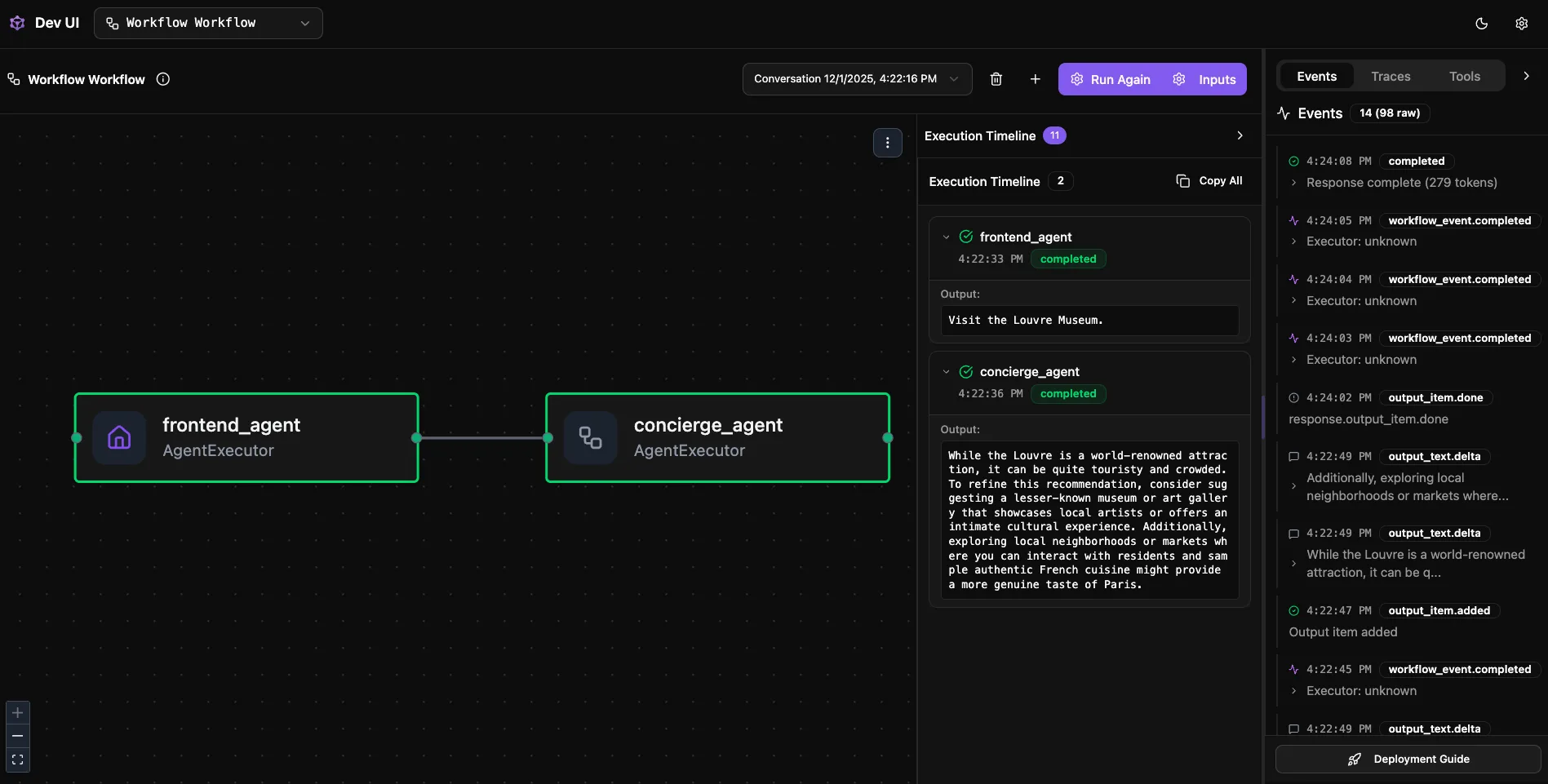
这是本文最亮眼的部分。过去我们调试 Agent,靠的是 print() 和无穷无尽的控制台日志。现在我们有了 DevUI。
DevUI 是什么? 它是 Agent Framework 专门面向开发者打造的“内循环(inner-loop)”工具。当 GHModel.AI 运行时,DevUI 会提供一个可视化控制台:
-
思维链可视化(Chain of Thought Visualization):你不再需要猜 Agent 为什么选 Tool A 而不是 Tool B。在 DevUI 里,你能像看流程图一样看到每一步 Reasoning、Action、Observation。这不只是调试,而是给 Agent 行为做“X 光透视”。
-
实时状态监控(Real-Time State Monitoring):Agent 的 Memory 里存了什么?上下文是否溢出?DevUI 可以实时查看 Conversation State,快速定位“幻觉”根因。
Python:
cd GHModel.Python.AI/GHModel.Python.AI.Workflow.DevUI
pip install agent-framework agent-framework-devui python-dotenv
python main.py
# Browser opens automatically at http://localhost:8090
.NET:
cd GHModel.dotNET.AI/GHModel.dotNET.AI.Workflow.DevUI
dotnet run
# DevUI: https://localhost:50516/devui
# OpenAI API: https://localhost:50516/v1/responses
第三阶段:交付与交互(Delivery & Interaction)——AG-UI
调试做完后,老板来一句:“发我个链接,我也试试。” 这时候,不要手搓 React 前端! 你需要的是 AG-UI。
AG-UI 解决什么问题? 它是标准化的 Agent-User 交互协议。在 GHModel.AI 案例中,接入 AG-UI 后:
- 开箱即用前端(Out-of-the-Box Frontend):Agent Framework 可以直接暴露符合 AG-UI 协议的接口。任何支持 AG-UI 的前端(例如 CopilotKit 提供的组件)都能直接接入你本地的 Agent。
- 流式响应与生成式 UI(Streaming Responses & Generative UI):不仅支持文本流式输出,还支持服务端推送 UI 组件。这意味着 Agent 能基于内容动态渲染图表、表格、卡片,而无需前端硬编码。
AG-UI Supported Features
- ✅ Streaming responses (SSE)
- ✅ Backend tool rendering
- ✅ Human-in-the-Loop approvals
- ✅ Shared state synchronization
- ✅ Seamless CopilotKit integration
Implementation Examples
Python Server:
# Server — Register AG-UI endpoint
from agent_framework_ag_ui import add_agent_framework_fastapi_endpoint
from workflow import workflow

app = FastAPI()
agent = workflow.as_agent(name="Travel Agent")
add_agent_framework_fastapi_endpoint(app, agent, "/")
.NET Server:
// Program.cs — ASP.NET Core AG-UI endpoint registration
using Microsoft.Agents.AI.Hosting.AGUI.AspNetCore;

var builder = WebApplication.CreateBuilder(args);
builder.Services.AddAGUI();

var app = builder.Build();
AIAgent workflowAgent = ChatClientAgentFactory.CreateTravelAgenticChat();
app.MapAGUI("/", workflowAgent);
await app.RunAsync();
从 DevUI 到 AG-UI,本质上是从“开发者视角”无缝切换到“用户视角”。我们可以使用 CopilotKit 构建 UI。
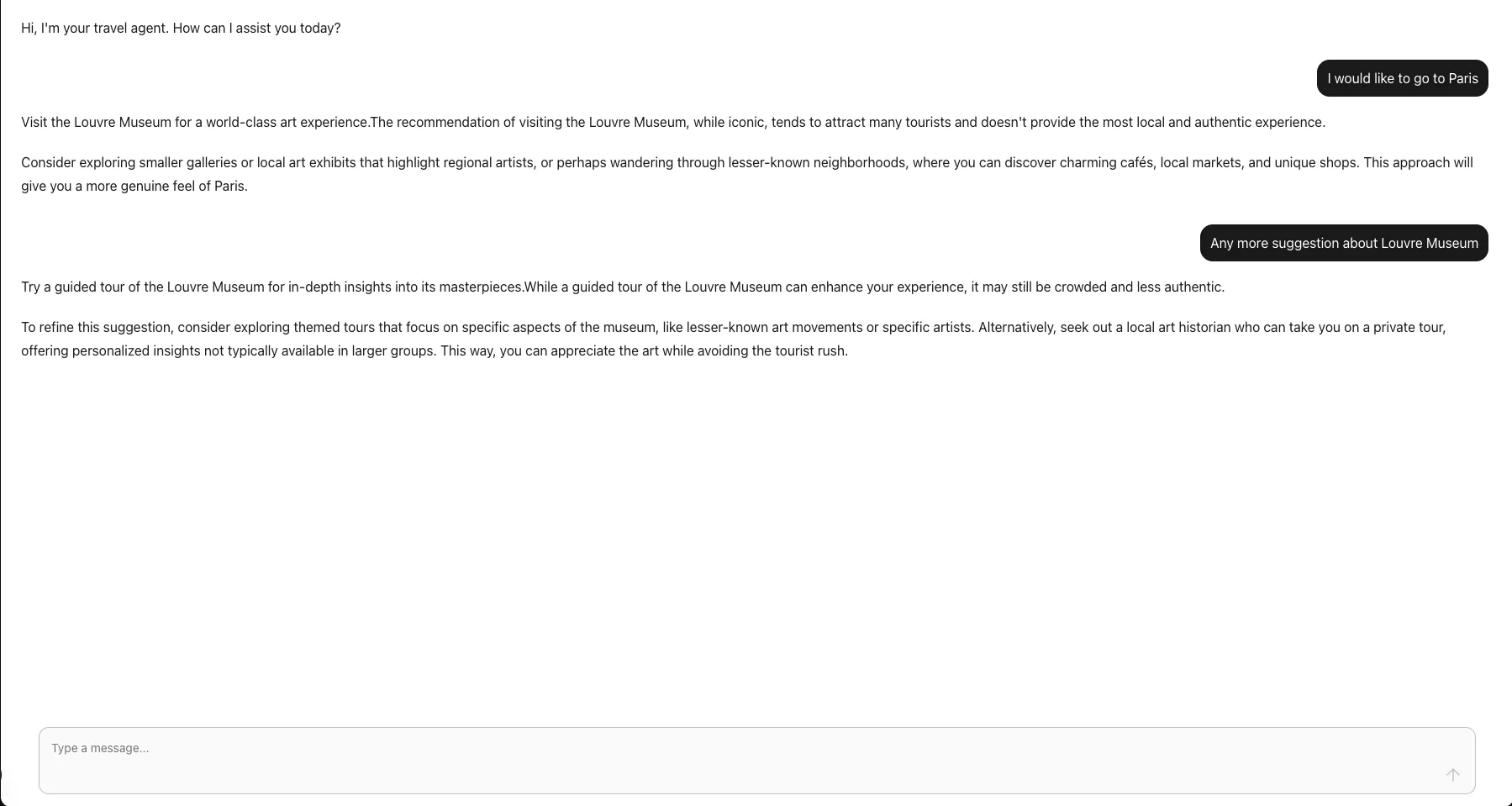
第四阶段:性能追踪(Performance Tracking)——OpenTelemetry
在 Agent 上线前,除了“能不能用”,我们还必须回答:“够不够快?贵不贵?”
这正是 OpenTelemetry(OTel) 的价值所在。在 Agent Framework 里,OpenTelemetry 支持是**内建(baked-in)**的。在 GHModel.AI 代码中,通常只需一行配置(例如 AddOpenTelemetry 或 setup_observability):
-
分布式追踪(Distributed Tracing):当一个请求进入系统,经过路由、Guardrails、调用 GitHub Models,再返回结果,OTel 会生成完整 Flame Graph。你可以精确看到:
- 网络 I/O 花了多久?
- LLM Token 生成花了多久?
- 本地逻辑处理花了多久?
-
成本透明(Cost Transparency):结合 OTel Metrics,我们可以监控 Token 消耗速率。这对从 GitHub Models(免费/原型阶段)迁移到 Azure OpenAI(付费/生产阶段)的成本评估至关重要。
🔧 Quick Setup
Python:
# Enable telemetry in one line
from agent_framework.observability import setup_observability
from agent_framework import setup_logging

setup_observability()
setup_logging()
.NET:
// OpenTelemetry configuration
var tracerProvider = Sdk.CreateTracerProviderBuilder()
    .AddSource("*Microsoft.Agents.AI")
    .AddOtlpExporter(options => options.Endpoint = new Uri("http://localhost:4317"))
    .Build();
Environment Variables:
ENABLE_OTEL=true
ENABLE_SENSITIVE_DATA=true               # Enable sensitive data logging in dev
OTLP_ENDPOINT=http://localhost:4317       # Aspire Dashboard / OTLP Collector
APPLICATIONINSIGHTS_CONNECTION_STRING=... # Azure Application Insights (optional)
📈 Visualization Options
Platform
Use Case
Quick Start
Aspire Dashboard
本地开发
docker run --rm -d -p 18888:18888 -p 4317:18889 mcr.microsoft.com/dotnet/aspire-dashboard:latest
Application Insights
生产监控
设置 APPLICATIONINSIGHTS_CONNECTION_STRING
Grafana Dashboards
高级可视化
Agent Overview, Workflow Overview
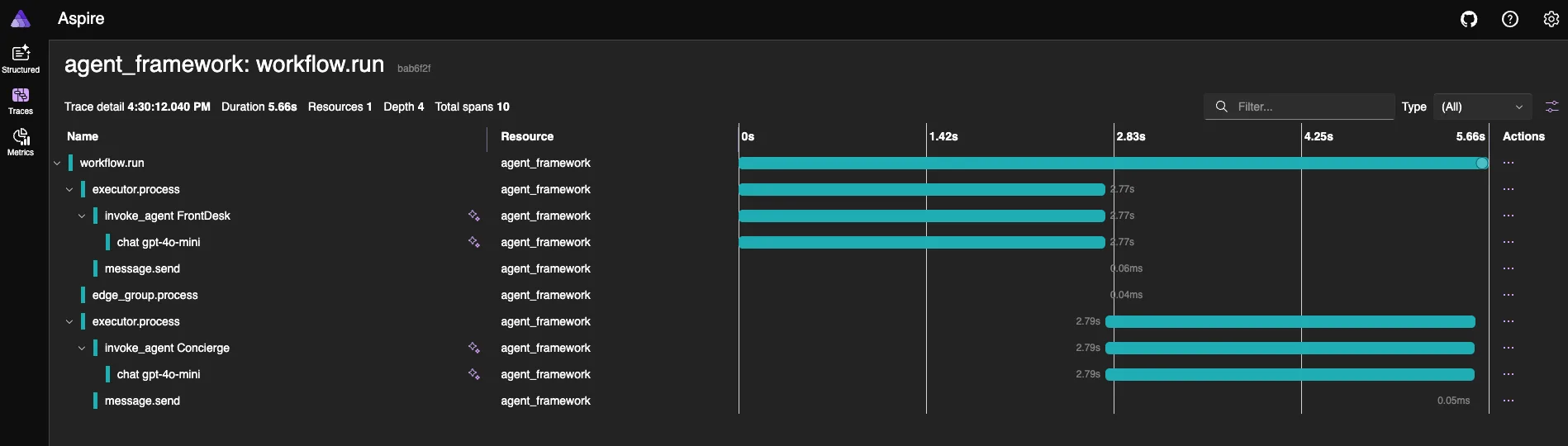
架构总览(Architecture Overview)
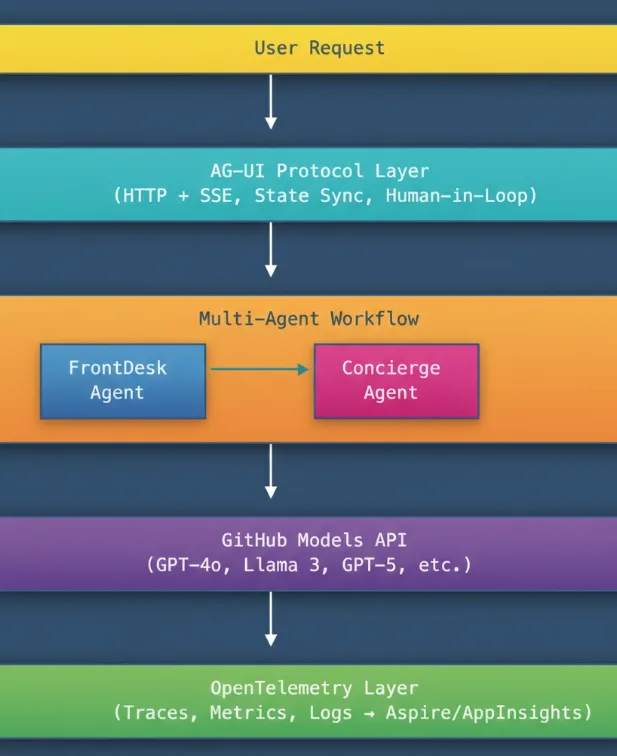
总结:构建你的“效率闭环”
回到 GHModel.AI 这个案例,它不只是一个代码样例,更展示了现代 Agent 开发的最佳实践架构:
Layer
Tool
Purpose
Model Layer
GitHub Models
用免费且前沿的模型快速验证想法
Debug Layer
DevUI
获得“上帝视角”,快速迭代逻辑
Presentation Layer
AG-UI
标准化输出,秒级生成用户交互界面
Observability Layer
OpenTelemetry
用数据驱动优化,告别拍脑袋调参
最后想说
我鼓励每一位 Agent 开发者深入阅读 Agent-Framework-Samples 代码。别再用“记事本式”方式调试 AI——请给自己配上这些现代化武器,去构建下一代智能应用!
以 GitHub Models 实现快速原型、以 DevUI 完成可视化调试、以 AG-UI 打通无缝用户交互、以 OpenTelemetry 获得生产级可观测性,这套组合正在重塑我们构建 agentic 应用的范式。
你的 Agent 开发之旅就从这里开始。未来属于 Agentic。一起动手构建它!
Resources
- Microsoft Agent Framework Microsoft Agent Framework GitHub Repo
- Microsoft Agent Framework Samples Microsoft Agent Framework Samples
- Microsoft Agent Framework DevUI Samples DevUI Getting Started
- Microsoft Agent Framework Observability Guide Observability Samples
Category
作者

高级云布道师(Senior Cloud Advocate)
Kinfey Lo 是微软高级云布道师,专注于 Edge AI 生态中小语言模型(SLM)的开发与运营化。他是《Phi Cookbook》的作者,该资源面向 Phi 系列 SLM 的实践应用。他的专长在于构建适配 Edge AI 独特需求的 GenAIOps 策略。