reversi-mcp-ui
平台与服务by mfukushim
基于 MCP-UI 的简易 Reversi 游戏。当前 MCP 客户端未完整支持 UI Actions,需用文本坐标落子,如 A1 或 H6。
什么是 reversi-mcp-ui?
基于 MCP-UI 的简易 Reversi 游戏。当前 MCP 客户端未完整支持 UI Actions,需用文本坐标落子,如 A1 或 H6。
核心功能 (4 个工具)
new-gameStart a new Reversi game
get-boardget a Reversi board
select-useruser move a stone
select-assistantassistant move a stone
README
Simple Reversi for MCP-UI
English / Japanese
This is a simple Reversi game that uses MCP-UI. You can control your turn (fixed to black) by clicking on the screen.
However, its greatest feature is that "the rules of Reversi are decided by the MCP, making it difficult for the AI to cheat the rules of the game."
Because Reversi is simple, AI rarely cheats the game rules, but it's known that AI often cheats when playing more complex games.
In this MCP server, the game rules are handled by the MCP, making it difficult for AI to cheat (Note: There are currently some limitations).
The structure is relatively simple, so we believe it can be used as a reference for creating similar board games.
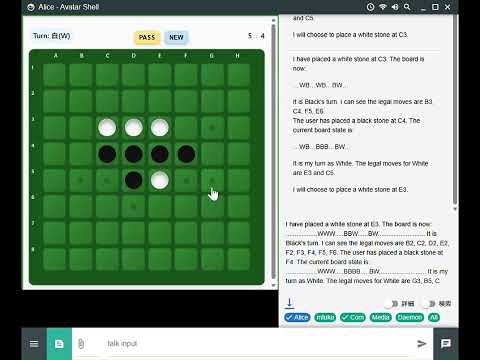
Available MCP clients
Currently, there is no MCP client that fully supports MCP-UI UI Actions, so while my Avatar-Shell is easy to understand, there are still many unstable aspects. nanobot.ai supports UI Actions, so the screen will scroll, but you can play by clicking.
The game can be played with the following MCP clients, except for the stone clicking operation. Instead of clicking, you can specify the position of the stone to be placed by conversation.
I believe that once the implementation of UI Actions is finalized, it will be possible to operate these MCP clients by clicking.
Note: This MCP server outputs HTML data using the ui:// schema for each move. If the MCP client function uses LLM to read the ui: tag, the AI may use a large amount of tokens.
When you first start using it, please check for unexpected token consumption.
Get started
Public Server
Reversi MCP-UI is built on the MCPAgent mechanism of CloudFlare AI Agent and supports Streamable-http connections.
A demo using Cloudflare workers is available below.
Please configure the following MCP settings on each MCP client.
{
  "mcpServers": {
    "reversi": {
      "type": "streamable-http",
      "url": "https://reversi-mcp-ui.daisycodes.workers.dev/mcp"
    }
  }
}
After successfully connecting Reversi, you can start playing by clicking "Play Reversi".
Depending on the AI's performance, you may also need to instruct the user to "It is your turn to play white pieces and place them in the best position."
Smithery.ai
https://smithery.ai/server/@mfukushim/reversi-mcp-ui
(The public server may be shut down in the future.)
Local Server
You can run it as a local server by running wrangler locally.
pnpm run dev # run wrangler local

or

npm run dev # run wrangler local
Please configure the following MCP settings on each MCP client.
{
  "mcpServers": {
    "reversi": {
      "type": "streamable-http",
      "url": "http://localhost:8787/mcp"
    }
  }
}
Note: Starting wrangler seems to result in an error within a Docker container.
Tool Functions and UI Actions
tool functions
- new-game
Displays the initial game screen. If the game is in progress, the initial screen will be displayed. - get-board
Get the Reversi board. When you first run it, the initial game screen will be displayed. - select-user
Places the black stone (user turn). Coordinates are specified from A1 to H8. If there is no choice but to pass the turn, call it with PASS. To end/reset the game, call it with NEW. In environments where UI Actions are implemented, you can play the game without using them. In that case, if you configure the MCP client so that the select-user tool function cannot be called, the AI will not be able to control the user turn. - select-assistant
Place the white stone (AI turn). The coordinates are A1-H8. If you have no choice but to pass your turn, call it with PASS.
UI Actions
Currently, many MCP clients have not implemented UI Actions or are in the process of implementing them. Currently, we expect the following behaviors in reversi MCP-UI.
- tool select-user
The user controlled the turn within the iframe screen (placed a black stone, passed, started a new game)
It is assumed that this operation will be executed by the select-user tool on the reversi MCP without going through AI. Extract the text from the execution result of select-user and send it to the AI as user input.
Like "board updated. user put B at A1"
This is expected to allow the AI to take some action (for example, knowing that the user has placed a black stone, then determining that the AI needs to operate a white stone and executing select-assistant).
Program Structure
Reversi rules are processed within the MCP server. This means that the AI cannot directly intervene in the execution of the rules. This prevents the AI from cheating according to the rules, which is a common occurrence with AI.
Note
In the current specifications, strictly speaking, AI may interfere with the rules in the following cases:
- The AI may call the tool (select-user) on the user's turn without permission.
- The AI may be able to read the user's moves during their turn (this is not an issue in Reversi, but it is necessary to take measures in games where you hide your moves or cards).
These issues are affected by the MCP specifications, MCP-UI specifications, and MCP client specifications, so it is unclear whether they can be resolved in the future.
Rule Logic
The equivalent JavaScript/Typescript reversi processing class ReversiEngine is located in src/rule-logic/reversi.ts and src/rule-logic/board.html.
The class ReversiEngine is the reversi rule processing that ChatGPT is instructed to generate.
Ideally, this would only be necessary within the MCP, but the same processing is also placed in the JavaScript within the HTML to determine the behavior when clicked.
The state of the board is determined in reversi.ts in MCP and is stored in the MCP session.
Board generation
The board is drawn using html, css, and javascript in src/rule-logic/board.html.
The board information is displayed according to the information from the MCP, and simple motions are processed in response to user clicks.
To set the board information in the html, simple template processing is performed in src/rule-logic/boardDrawer.ts.
MCP handling
MCP and MCP-UI processing is done in src/index.ts. It is almost identical to the Cloudflare MCPAgent sample code.
Local Debugging and Deployment
This mostly follows the instructions for running and debugging Cloudflare MCPAgent.
pnpm install # install

pnpm run dev # start dev server

pnpm run inspector # start inspector

pnpm run deploy # deploy to cloudflare workers
Guide (Japanese)
常见问题
reversi-mcp-ui 是什么?
基于 MCP-UI 的简易 Reversi 游戏。当前 MCP 客户端未完整支持 UI Actions,需用文本坐标落子,如 A1 或 H6。
reversi-mcp-ui 提供哪些工具?
提供 4 个工具,包括 new-game、get-board、select-user 等。
相关 Skills
MCP构建
by anthropics
聚焦高质量 MCP Server 开发,覆盖协议研究、工具设计、错误处理与传输选型,适合用 FastMCP 或 MCP SDK 对接外部 API、封装服务能力。
✎ 想让 LLM 稳定调用外部 API,就用 MCP构建:从 Python 到 Node 都有成熟指引,帮你更快做出高质量 MCP 服务器。
Slack动图
by anthropics
面向Slack的动图制作Skill,内置emoji/消息GIF的尺寸、帧率和色彩约束、校验与优化流程,适合把创意或上传图片快速做成可直接发送的Slack动画。
✎ 帮你快速做出适配 Slack 的动图,内置约束规则和校验工具,少踩上传与播放坑,做表情包和演示都更省心。
接口测试套件
by alirezarezvani
扫描 Next.js、Express、FastAPI、Django REST 的 API 路由,自动生成覆盖鉴权、参数校验、错误码、分页、上传与限流场景的 Vitest 或 Pytest 测试套件。
✎ 帮你把API与集成测试自动化跑顺,减少回归漏测;能力全面,尤其适合复杂接口场景的QA团队。
相关 MCP Server
Slack 消息
编辑精选by Anthropic
Slack 是让 AI 助手直接读写你的 Slack 频道和消息的 MCP 服务器。
✎ 这个服务器解决了团队协作中需要 AI 实时获取 Slack 信息的痛点,特别适合开发团队让 Claude 帮忙汇总频道讨论或发送通知。不过,它目前只是参考实现,文档有限,不建议在生产环境直接使用——更适合开发者学习 MCP 如何集成第三方服务。
by netdata
io.github.netdata/mcp-server 是让 AI 助手实时监控服务器指标和日志的 MCP 服务器。
✎ 这个工具解决了运维人员需要手动检查系统状态的痛点,最适合 DevOps 团队让 Claude 自动分析性能数据。不过,它依赖 NetData 的现有部署,如果你没用过这个监控平台,得先花时间配置。
by d4vinci
Scrapling MCP Server 是专为现代网页设计的智能爬虫工具,支持绕过 Cloudflare 等反爬机制。
✎ 这个工具解决了爬取动态网页和反爬网站时的头疼问题,特别适合需要批量采集电商价格或新闻数据的开发者。不过,它依赖外部浏览器引擎,资源消耗较大,不适合轻量级任务。