OpenGraph.io MCP Server
平台与服务by securecoders
用于 OpenGraph.io API 的 MCP server,可获取 OG 数据、截图、抓取网页并生成图像。
什么是 OpenGraph.io MCP Server?
用于 OpenGraph.io API 的 MCP server,可获取 OG 数据、截图、抓取网页并生成图像。
README
OpenGraph MCP Server (og-mcp)
og‑mcp is a Model‑Context‑Protocol (MCP) server that makes every OpenGraph.io ( https://opengraph.io ) API endpoint available to AI agents (e.g. Anthropic Claude, Cursor, LangGraph) through the standard MCP interface.
Why? If you already use OpenGraph.io to unfurl links, scrape HTML, extract article text, or capture screenshots, you can now give the same capabilities to your autonomous agents without exposing raw API keys.
Global Installation
You can install this package globally via npm:
npm install -g opengraph-io-mcp
Quick Install
CLI Installer (Recommended)
The easiest way to configure OpenGraph MCP for any supported client:
# Interactive mode - guides you through setup
npx opengraph-io-mcp-install

# Direct mode - specify client and app ID
npx opengraph-io-mcp-install --client cursor --app-id YOUR_APP_ID
Supported clients: cursor, claude-desktop, windsurf, vscode, zed, jetbrains
Claude Desktop Extension
For Claude Desktop users, you can also download the .mcpb extension for one-click installation from the Releases page.
Authentication
The hosted MCP server supports two authentication methods:
Option 1 — OAuth 2.1 (recommended for hosted deployments)
OAuth lets you authorize access through your OpenGraph.io dashboard without copying API keys into config files. The MCP client handles the entire browser login flow automatically.
Supported by: MCP clients that implement the Authorization Code + PKCE flow (Cursor, Claude Desktop 0.10+, VS Code with the MCP extension).
When the client connects with no credentials, the server returns 401 with a WWW-Authenticate header pointing to:
GET /.well-known/oauth-protected-resource
→ { "authorization_servers": ["https://dashboard-api.opengraph.io"] }
The client then fetches the authorization server metadata and starts the PKCE flow, redirecting your browser to https://dashboard.opengraph.io/oauth/consent where you log in and choose which API key to authorize.
No client-side config needed — the client discovers everything automatically.
Option 2 — x-app-id header (legacy / local dev)
Pass your App ID as an HTTP header. Suitable for local dev, CI, or clients that do not support OAuth.
Replace YOUR_OPENGRAPH_APP_ID with your OpenGraph.io App ID.
Client Configuration
All configurations below use the hosted HTTPS transport. OAuth is the recommended approach for shared/production use; the x-app-id header config is provided as a fallback.
OAuth (no static config needed)
For clients that support OAuth discovery, simply point at the hosted URL with no headers — the server will request authorization automatically:
{
  "mcpServers": {
    "opengraph": {
      "url": "https://mcp.opengraph.io/mcp"
    }
  }
}
x-app-id fallback
If your client does not support OAuth, or you prefer static config:
Claude Desktop
Config location:
- macOS:
~/Library/Application Support/Claude/claude_desktop_config.json - Windows:
%APPDATA%\Claude\claude_desktop_config.json
{
  "mcpServers": {
    "opengraph": {
      "url": "https://mcp.opengraph.io/mcp",
      "headers": {
        "x-app-id": "YOUR_OPENGRAPH_APP_ID"
      }
    }
  }
}
Claude Code
One-command installation:
claude mcp add --transport http --header "x-app-id: YOUR_OPENGRAPH_APP_ID" opengraph https://mcp.opengraph.io/mcp
Cursor
Config location: ~/.cursor/mcp.json
{
  "mcpServers": {
    "opengraph": {
      "url": "https://mcp.opengraph.io/mcp",
      "headers": {
        "x-app-id": "YOUR_OPENGRAPH_APP_ID"
      }
    }
  }
}
VS Code
Config location: .vscode/mcp.json (in your project directory)
VS Code supports input prompts for secure credential handling:
{
  "inputs": [
    {
      "type": "promptString",
      "id": "opengraph-app-id",
      "description": "OpenGraph App ID",
      "password": true
    }
  ],
  "servers": {
    "opengraph": {
      "type": "http",
      "url": "https://mcp.opengraph.io/mcp",
      "headers": {
        "x-app-id": "${input:opengraph-app-id}"
      }
    }
  }
}
Windsurf
Config location: ~/.codeium/windsurf/mcp_config.json
{
  "mcpServers": {
    "opengraph": {
      "url": "https://mcp.opengraph.io/mcp",
      "headers": {
        "x-app-id": "YOUR_OPENGRAPH_APP_ID"
      }
    }
  }
}
JetBrains AI Assistant
Add to your JetBrains AI Assistant MCP configuration:
{
  "mcpServers": {
    "opengraph": {
      "url": "https://mcp.opengraph.io/mcp",
      "headers": {
        "x-app-id": "YOUR_OPENGRAPH_APP_ID"
      }
    }
  }
}
Zed
Config location: ~/.config/zed/settings.json
Note: Zed uses context_servers instead of mcpServers:
{
  "context_servers": {
    "opengraph": {
      "transport": "http",
      "url": "https://mcp.opengraph.io/mcp",
      "headers": {
        "x-app-id": "YOUR_OPENGRAPH_APP_ID"
      }
    }
  }
}
Available Tools
Two authentication tiers: Data and Image Generation tools work with either OAuth or a simple
x-app-idAPI key — including the stdio transport and the Claude Desktop extension. Site Audit and Link Preview tools require OAuth (hosted HTTPS transport only), since they bill against your organization's Site Audit plan rather than a single API key.
OpenGraph.io Data Tools
All scraping/metadata tools default to the v3 API which enables auto_render, auto_proxy, and retry by default for higher success rates on complex pages. The query and extract tools use v1.1 (see notes).
| Tool Name | API Endpoint | Description | Documentation |
|---|---|---|---|
| Get OG Data | /api/3.0/site/<URL> | Fetch Open Graph metadata, HTML-inferred tags, and hybrid social preview data. Supports use_ai, ai_sanitize, load-more, proxy/retry, and all v3 smart defaults. | Docs |
| Get OG Scrape Data | /api/3.0/scrape/<URL> | Scrape raw HTML with full v3 rendering options including scroll-to-bottom, load-more clicks, and AI sanitization. | Docs |
| Get OG Screenshot | /api/3.0/screenshot/<URL> | Capture a screenshot. Supports full_page, dark_mode, capture_delay, navigationTimeout, hideSelectors, and custom viewport dimensions. | Docs |
| Get OG Query | /api/1.1/query/<URL> | Ask a natural-language question about a page's content. Uses v1.1 (100–200 credits/request) until billing path is updated for v3. | Docs |
| Get OG Extract | /api/1.1/extract/<URL> | Extract specific HTML elements (h1, p, a, img, etc.) by tag name. Stays on v1.1 — no v3 GET route exists for this endpoint. | Docs |
| Get OG Markdown | /api/3.0/markdown/<URL> | Convert any URL's HTML to clean Markdown. Strips nav/ads by default (only_main_content: true). Supports include_tags/exclude_tags selectors. Note: JS-heavy/SPA pages require full_render: true — v3 auto_render does not apply to this endpoint. | Docs |
Language detection: All tools send accept_lang: auto by default, which mirrors the request's Accept-Language header. Pass an explicit BCP 47 tag (e.g. en-US, fr) to override.
Site Audit & Link Preview Tools
Requires OAuth 2.1 (see Authentication) and an active Site Audit plan. These tools are only available over the hosted HTTPS transport — they are not available via the x-app-id header or the stdio/Claude Desktop extension, since they need your organization identity, not just an API key.
| Tool Name | Description |
|---|---|
| Discover Site URLs | Crawl a domain (sitemap + link discovery) and return every page found, grouped by depth, along with your remaining monthly audit quota. |
| Start Site Audit | Kick off an async, multi-page SEO/social audit. Pass an explicit urls[] list (from discovery, a sitemap, or a codebase route scan) or let the backend crawl the domain itself. Returns an auditId immediately. |
| Get Site Audit Status | Poll an in-progress audit (QUEUED → CRAWLING → SCORING → COMPLETE). |
| Get Site Audit Report | Retrieve the full report once complete: overall score (0–100), an AI-generated executive summary, prioritized fixes, per-page scores, and Open Graph coverage rates. |
| Preview Page Audit | Instant, synchronous single-URL quality check with score + issues. Does not consume audit quota. |
| Get Link Preview | Instant, synchronous check of how a URL will render when shared — returns Facebook, Twitter/X, LinkedIn, and Google preview cards plus a quality score and fix list. Does not consume audit quota. |
Image Generation Tools
| Tool Name | Description |
|---|---|
| Generate Image | Create professional images: illustrations, diagrams (Mermaid/D2/Vega), icons, social cards, or QR codes |
| Iterate Image | Refine, modify, or create variations of existing generated images |
| Inspect Image Session | Retrieve session metadata and asset history for image generation sessions |
| Export Image Asset | Export generated image assets as inline base64, with optional disk write when running locally |
Image Generation
The og-mcp server includes powerful AI-driven image generation capabilities, perfect for creating social media cards, architecture diagrams, icons, and more.
Generate Image
Create images from natural language prompts or diagram code.
Supported Image Types (kind):
illustration- General-purpose AI-generated imagesdiagram- Technical diagrams from Mermaid, D2, or Vega syntaxicon- App icons and logossocial-card- OG images optimized for social sharingqr-code- QR codes with optional styling
Preset Aspect Ratios:
- Social:
og-image,twitter-card,twitter-post,linkedin-post,facebook-post,instagram-square,instagram-portrait,instagram-story,youtube-thumbnail - Standard:
wide,square,portrait - Icons:
icon-small,icon-medium,icon-large
Style Presets:
github-dark, github-light, notion, vercel, linear, stripe, neon-cyber, pastel, minimal-mono, corporate, startup, documentation, technical
Diagram Templates:
auth-flow, oauth2-flow, crud-api, microservices, ci-cd, gitflow, database-schema, state-machine, user-journey, cloud-architecture, system-context
Example Usage:
// Generate a social card
generateImage({
  prompt: "A modern tech startup hero image with abstract geometric shapes",
  kind: "social-card",
  aspectRatio: "og-image",
  stylePreset: "vercel",
  brandColors: ["#0070F3", "#000000"]
})

// Generate a diagram from Mermaid syntax
generateImage({
  prompt: "graph TD; A[User] --> B[API]; B --> C[Database]",
  kind: "diagram",
  diagramSyntax: "mermaid",
  stylePreset: "github-dark"
})
Iterate Image
Refine or modify an existing generated image.
Use cases:
- Edit specific parts: "change the background to blue"
- Apply style changes: "make it more minimalist"
- Fix issues: "remove the text", "make the icon larger"
- Crop to specific coordinates
Example:
iterateImage({
  sessionId: "uuid-from-generate",
  assetId: "uuid-from-generate",
  prompt: "Change the primary color to #0033A0 and add a subtle drop shadow"
})
Inspect Image Session
Review session details and find asset IDs for iteration.
Returns:
- Session metadata (creation time, name, status)
- List of all assets with prompts, toolchains, and status
- Parent-child relationships showing iteration history
Example:
inspectImageSession({
  sessionId: "uuid-from-generate"
})
Export Image Asset
Export a generated image asset by session and asset ID. Returns the image inline as base64 along with metadata (format, dimensions, size).
When running locally (stdio transport), you can optionally provide a destinationPath to save the image to disk. On hosted/HTTP transport, the path is ignored and the image is returned inline only.
Examples:
// Inline only (works everywhere)
exportImageAsset({
  sessionId: "uuid-from-generate",
  assetId: "uuid-from-generate"
})

// Save to disk (stdio/local only)
exportImageAsset({
  sessionId: "uuid-from-generate",
  assetId: "uuid-from-generate",
  destinationPath: "/Users/me/project/images/hero.png"
})
Guided Workflows (Prompts)
In addition to tools, the server exposes named prompts — pre-built, multi-step workflows that MCP clients can surface directly to users (e.g. as slash commands) or that agents can invoke by name for a more reliable result than freeform tool-calling.
| Prompt Name | What it does |
|---|---|
analyze-webpage | Fetches a page's metadata and readable content in parallel, then summarizes or answers a specific question about it. |
extract-structured-data | Extracts named fields (title, price, SKU, etc.) from a page using CSS selectors — ideal for ecommerce, job listings, and articles. |
get-page-content | Converts a URL to clean readable text/Markdown, stripping boilerplate — ready to read or pass to another model. |
run-site-audit | Full site-audit workflow: asks the user their preferred scope (whole site / core pages / specific section / codebase scan), discovers URLs if needed, starts the audit, polls status, and returns a readable report. Requires OAuth. |
create-branded-diagram | Guided workflow for creating diagrams (flowchart, sequence, architecture, ER, state) that match your brand identity. |
iterate-and-refine | Best practices for iterating on a previously generated image to reach the desired result. |
create-asset-set | Generates a visually consistent set of icons, social cards, diagrams, or illustrations. |
quick-icon | Quickly generates a single icon with sensible defaults. |
How it works
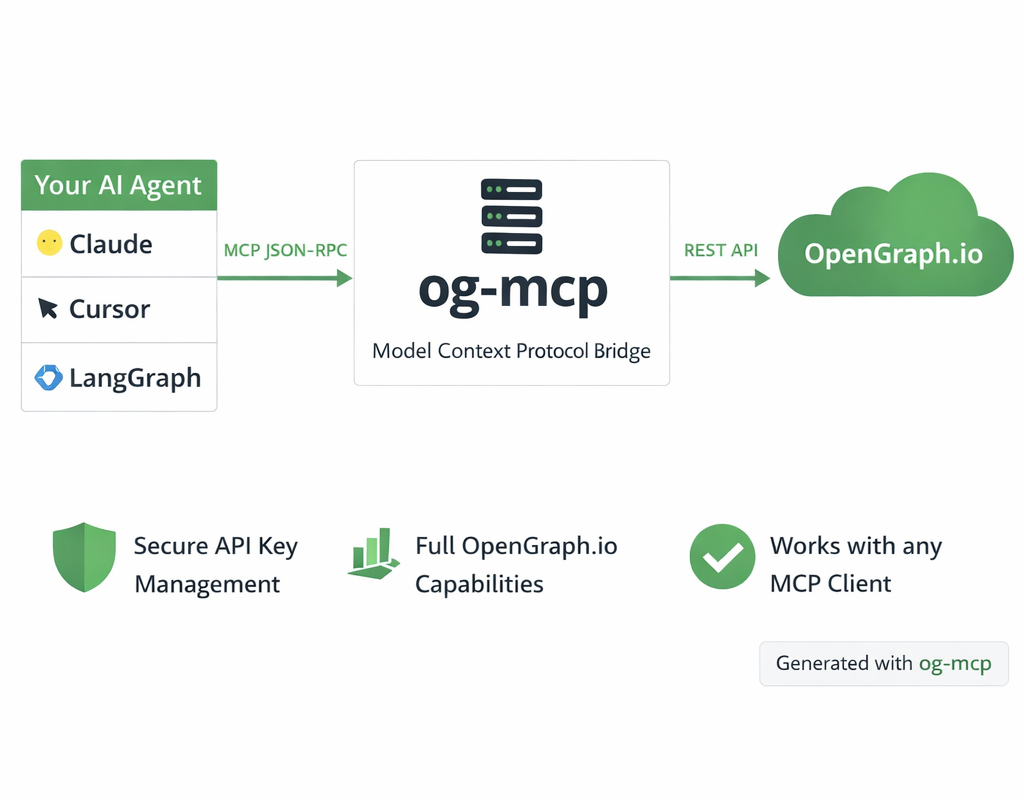 <sup>Diagram generated with og-mcp's image generation tools</sup>
The og-mcp server acts as a bridge between AI clients (like Claude or other LLMs) and the OpenGraph.io API:
- AI client makes a tool call to one of the available MCP functions
- og-mcp server receives the request and formats it for the OpenGraph.io API
- OpenGraph.io processes the request and returns data
- og-mcp transforms the response into a format suitable for the AI client
- AI client receives the structured data ready for use
This abstraction prevents exposing API keys directly to the AI while providing full access to OpenGraph.io capabilities.
Setup and Running
- Clone this repository
- Install dependencies:
code
npm install - Build the TypeScript code:
code
npm run build - Start the server:
code
npm start
The server will run on port 3010 by default (configurable via PORT environment variable).
Configuration
OAuth 2.1 (hosted HTTP server)
When running the Streamable HTTP server (npm start), set these env vars:
# Required: URL of the apifur-api JWKS endpoint
OAUTH_JWKS_URL=https://dashboard-api.opengraph.io/oauth/jwks.json

# Optional: Issuer string to validate in bearer tokens (defaults to OAUTH_ISSUER)
OAUTH_ISSUER=https://dashboard-api.opengraph.io

# Optional: Expected audience claim (default: https://mcp.opengraph.io/mcp)
OAUTH_AUDIENCE=https://mcp.opengraph.io/mcp

# Optional: Override the canonical MCP resource URL returned in 401 headers
MCP_RESOURCE_URL=https://mcp.opengraph.io/mcp
When OAUTH_JWKS_URL is not set, bearer-token verification is disabled and only the x-app-id fallback is active.
x-app-id fallback / local dev
Omit the OAuth env vars and use a static App ID instead:
OPENGRAPH_APP_ID=your_app_id_here
# or
APP_ID=your_app_id_here
This also works as the fallback for any HTTP request that includes an x-app-id header.
Stdio transport
For command-line usage pass the App ID directly:
opengraph-io-mcp --app-id YOUR_APP_ID
Transport Options
Stdio Transport (Recommended)
For command-line usage and npm global installation, the server can be run with stdio transport:
npm run start:stdio
You can pass the OpenGraph API key directly via command-line argument:
npm run start:stdio -- --app-id YOUR_APP_ID
When installed globally:
opengraph-io-mcp --app-id YOUR_APP_ID
This mode allows the server to be invoked directly by other applications that use MCP.
HTTP/SSE Transport
This method runs a web server that can be accessed over HTTP and uses SSE for streaming:
npm start
Troubleshooting
- If tools aren't showing up, check that the server is running and the URL is correctly configured in Cursor
- Check the server logs for any connection or authorization issues
- Verify that Claude has been instructed to use the specific tools by name
常见问题
OpenGraph.io MCP Server 是什么?
用于 OpenGraph.io API 的 MCP server,可获取 OG 数据、截图、抓取网页并生成图像。
相关 Skills
MCP构建
by anthropics
聚焦高质量 MCP Server 开发,覆盖协议研究、工具设计、错误处理与传输选型,适合用 FastMCP 或 MCP SDK 对接外部 API、封装服务能力。
✎ 想让 LLM 稳定调用外部 API,就用 MCP构建:从 Python 到 Node 都有成熟指引,帮你更快做出高质量 MCP 服务器。
Slack动图
by anthropics
面向Slack的动图制作Skill,内置emoji/消息GIF的尺寸、帧率和色彩约束、校验与优化流程,适合把创意或上传图片快速做成可直接发送的Slack动画。
✎ 帮你快速做出适配 Slack 的动图,内置约束规则和校验工具,少踩上传与播放坑,做表情包和演示都更省心。
接口测试套件
by alirezarezvani
扫描 Next.js、Express、FastAPI、Django REST 的 API 路由,自动生成覆盖鉴权、参数校验、错误码、分页、上传与限流场景的 Vitest 或 Pytest 测试套件。
✎ 帮你把API与集成测试自动化跑顺,减少回归漏测;能力全面,尤其适合复杂接口场景的QA团队。
相关 MCP Server
Slack 消息
编辑精选by Anthropic
Slack 是让 AI 助手直接读写你的 Slack 频道和消息的 MCP 服务器。
✎ 这个服务器解决了团队协作中需要 AI 实时获取 Slack 信息的痛点,特别适合开发团队让 Claude 帮忙汇总频道讨论或发送通知。不过,它目前只是参考实现,文档有限,不建议在生产环境直接使用——更适合开发者学习 MCP 如何集成第三方服务。
by netdata
io.github.netdata/mcp-server 是让 AI 助手实时监控服务器指标和日志的 MCP 服务器。
✎ 这个工具解决了运维人员需要手动检查系统状态的痛点,最适合 DevOps 团队让 Claude 自动分析性能数据。不过,它依赖 NetData 的现有部署,如果你没用过这个监控平台,得先花时间配置。
by d4vinci
Scrapling MCP Server 是专为现代网页设计的智能爬虫工具,支持绕过 Cloudflare 等反爬机制。
✎ 这个工具解决了爬取动态网页和反爬网站时的头疼问题,特别适合需要批量采集电商价格或新闻数据的开发者。不过,它依赖外部浏览器引擎,资源消耗较大,不适合轻量级任务。