什么是 io.github.gluip/chart-canvas?
可创建交互式可视化,并查询 SQLite、CSV、Parquet、JSON 等数据源内容。
README
Chart Canvas MCP Server
Interactive visualization dashboard for AI assistants via Model Context Protocol
Create beautiful charts, diagrams, and tables directly from your AI conversations. Chart Canvas provides a real-time dashboard that displays visualizations as you work with LLMs like Claude.
Demo
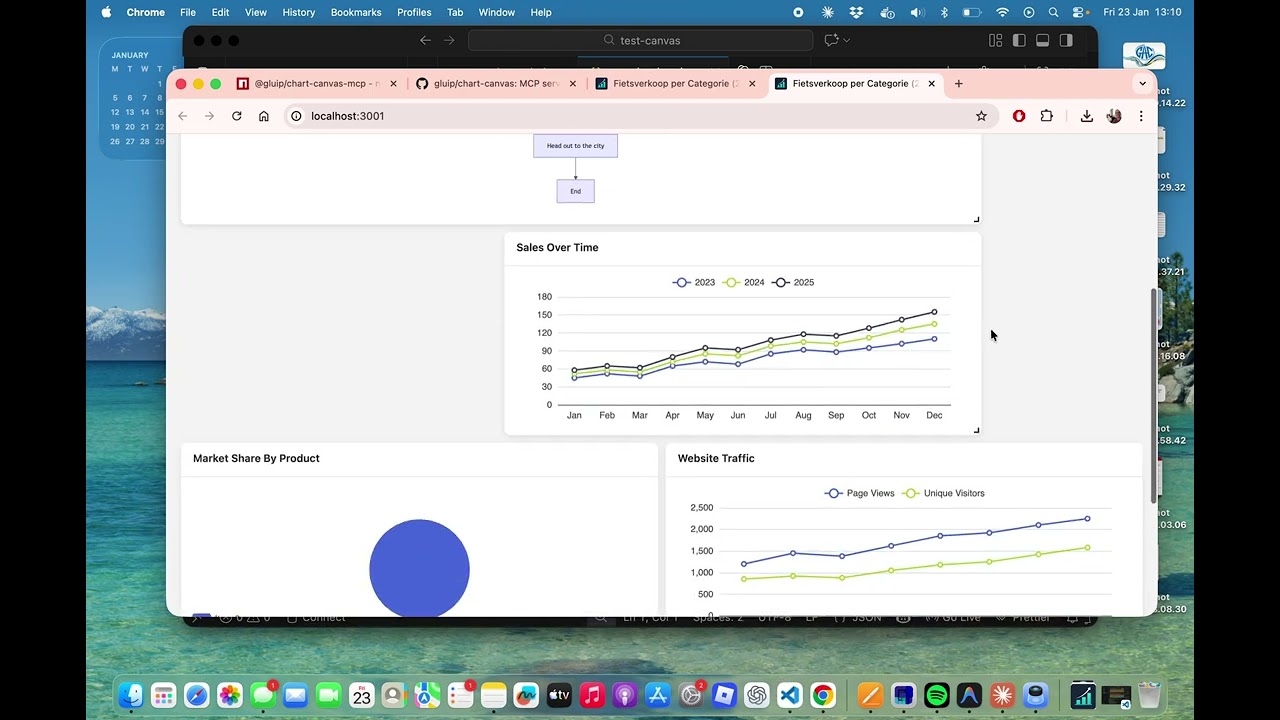
Watch the full demo on YouTube to see Chart Canvas in action!
Features
✨ Multiple Chart Types: Line, bar, scatter, pie charts, tables, and Mermaid diagrams
🎨 Interactive Dashboard: Drag-and-drop grid layout with real-time updates
🔄 Live Synchronization: Changes appear instantly in your browser
📊 Rich Visualizations: Powered by ECharts and Mermaid
💾 Universal Data Sources: Query SQLite, CSV, Parquet, JSON, and NDJSON files directly
⚡ Smart Data Flow: Execute queries server-side - data stays local, never sent to LLM
🔒 Privacy First: Your data never leaves your machine
🚀 Easy Setup: One command to get started
🌐 Production Ready: Built-in production mode with optimized builds
Supported Data Sources
Chart Canvas can query and visualize data from multiple file formats:
- SQLite (
.db,.sqlite,.sqlite3) - Relational databases - CSV (
.csv) - Comma-separated values - Parquet (
.parquet) - Columnar storage format - JSON (
.json) - JSON arrays of objects - NDJSON (
.jsonl,.ndjson) - Newline-delimited JSON
Privacy & Performance: All queries execute locally on your machine using DuckDB. Query results are transformed into visualizations server-side - only metadata (chart configuration) is sent to the LLM, never your actual data. This makes it fast, scalable, and private.
Quick Start
Installation
npm install -g @gluip/chart-canvas-mcp
Or use directly with npx (no installation needed):
npx @gluip/chart-canvas-mcp
Configuration
Add to your MCP client configuration (e.g., Claude Desktop):
macOS: ~/Library/Application Support/Claude/claude_desktop_config.json
Windows: %APPDATA%/Claude/claude_desktop_config.json
{
  "mcpServers": {
    "chart-canvas": {
      "command": "npx",
      "args": ["-y", "@gluip/chart-canvas-mcp"]
    }
  }
}
Usage
- Start your MCP client (e.g., Claude Desktop)
- The server will automatically start on port 3000
- Use the
showCanvastool to open the dashboard in your browser - Ask the AI to create visualizations!
Example Prompts
"Show me a line chart comparing sales data for 2023 and 2024"

"Create a pie chart showing market share by region"

"Draw a flowchart for the user authentication process"

"Make a table with team member information"

"Show me the database schema for my SQLite database"

"Query the athletes table and show the top 10 with most personal records"

"Create a chart showing sales trends from the database grouped by region"
MCP Tools
addVisualization
Create charts, diagrams, and tables on the canvas.
Supported Types:
line- Line charts with multiple seriesbar- Bar charts for comparisonsscatter- Scatter plots for data distributionpie- Pie charts with labelstable- Data tables with headersflowchart- Mermaid diagrams (flowcharts, sequence diagrams, Gantt charts, etc.)
Example:
{
  type: "line",
  title: "Monthly Sales",
  series: [
    { name: "2023", data: [[1, 120], [2, 132], [3, 101]] },
    { name: "2024", data: [[1, 220], [2, 182], [3, 191]] }
  ],
  xLabels: ["Jan", "Feb", "Mar"]
}
removeVisualization
Remove a specific visualization by ID.
clearCanvas
Remove all visualizations from the canvas.
showCanvas
Open the dashboard in your default browser.
getDatabaseSchema
Inspect the structure of a SQLite database to understand available tables and columns before writing queries.
Parameters:
databasePath- Path to SQLite database file (e.g.,./data/mydb.sqliteor absolute path)
Example:
{
  databasePath: "/path/to/database.db";
}
Returns: Formatted schema showing all tables, columns, data types, and constraints.
queryAndVisualize
Execute a SQL query on a SQLite database and create a visualization from the results. Queries are executed server-side and must be read-only (SELECT only). Maximum 10,000 rows.
Parameters:
databasePath- Path to SQLite database filequery- SQL SELECT query (read-only)visualizationType- Type of chart:line,bar,scatter,pie, ortablecolumnMapping(optional for table) - Mapping of columns to chart axes:xColumn- Column for X-axis (required for charts)yColumns- Array of columns for Y-axis (required for charts)seriesColumn- Column to group data into separate series (optional)groupByColumn- Alternative grouping column (optional)
title- Optional title for visualizationdescription- Optional descriptionuseColumnAsXLabel- If true, use X column values as labels instead of numbers
Example:
{
  databasePath: "./data/sales.db",
  query: "SELECT region, SUM(revenue) as total FROM sales GROUP BY region",
  visualizationType: "bar",
  columnMapping: {
    xColumn: "region",
    yColumns: ["total"]
  },
  title: "Revenue by Region",
  useColumnAsXLabel: true
}
Security: Only SELECT and WITH (CTE) queries are allowed. INSERT, UPDATE, DELETE, DROP, and other modifying operations are blocked.
Architecture
- Backend: Node.js + TypeScript + Express + MCP SDK
- Frontend: Vue 3 + ECharts + Mermaid + Grid Layout
- Communication: Real-time polling for instant updates
Development
Local Development
# Clone repository
git clone https://github.com/gluip/chart-canvas.git
cd chart-canvas

# Install backend dependencies
cd backend
npm install

# Install frontend dependencies
cd ../frontend
npm install

# Development mode (backend + frontend separate)
# Terminal 1 - Backend
cd backend
npm run dev

# Terminal 2 - Frontend
cd frontend
npm run dev

# Production mode (single server)
cd backend
npm run build:all
npm run start:prod
MCP Configuration for Local Development
{
  "mcpServers": {
    "chart-canvas": {
      "command": "/path/to/node",
      "args": [
        "/path/to/chart-canvas/backend/node_modules/.bin/tsx",
        "/path/to/chart-canvas/backend/src/index.ts"
      ]
    }
  }
}
License
MIT © 2026 Martijn
Links
常见问题
io.github.gluip/chart-canvas 是什么?
可创建交互式可视化,并查询 SQLite、CSV、Parquet、JSON 等数据源内容。
相关 Skills
技术栈评估
by alirezarezvani
对比框架、数据库和云服务,结合 5 年 TCO、安全风险、生态活力与迁移复杂度做量化评估,适合技术选型、栈升级和替换路线决策。
✎ 帮你系统比较技术栈优劣,不只看功能,还把TCO、安全性和生态健康度一起量化,选型和迁移决策更稳。
资深数据科学家
by alirezarezvani
覆盖实验设计、特征工程、预测建模、因果推断与模型评估,适合用 Python/R/SQL 做 A/B 测试、时序分析和生产级 ML 落地,支撑数据驱动决策。
✎ 从 A/B 测试、因果分析到预测建模一条龙搞定,既有硬核统计方法也懂业务沟通,特别适合把数据结论真正落地。
资深架构师
by alirezarezvani
适合系统设计评审、ADR记录和扩展性规划,分析依赖与耦合,权衡单体或微服务、数据库与技术栈选型,并输出Mermaid、PlantUML、ASCII架构图。
✎ 搞系统设计、技术选型和扩展规划时,用它能更快理清架构决策与依赖关系,还能直接产出 Mermaid/PlantUML 图,方案讨论效率很高。
相关 MCP Server
PostgreSQL 数据库
编辑精选by Anthropic
PostgreSQL 是让 Claude 直接查询和管理你的数据库的 MCP 服务器。
✎ 这个服务器解决了开发者需要手动编写 SQL 查询的痛点,特别适合数据分析师或后端开发者快速探索数据库结构。不过,由于是参考实现,生产环境使用前务必评估安全风险,别指望它能处理复杂事务。
SQLite 数据库
编辑精选by Anthropic
SQLite 是让 AI 直接查询本地数据库进行数据分析的 MCP 服务器。
✎ 这个服务器解决了 AI 无法直接访问 SQLite 数据库的问题,适合需要快速分析本地数据集的开发者。不过,作为参考实现,它可能缺乏生产级的安全特性,建议在受控环境中使用。
Firecrawl 智能爬虫
编辑精选by Firecrawl
Firecrawl 是让 AI 直接抓取网页并提取结构化数据的 MCP 服务器。
✎ 它解决了手动写爬虫的麻烦,让 Claude 能直接访问动态网页内容。最适合需要实时数据的研究者或开发者,比如监控竞品价格或抓取新闻。但要注意,它依赖第三方 API,可能涉及隐私和成本问题。