io.github.MasonChow/source-map-parser-mcp
编码与调试by masonchow
利用 source maps 将 JavaScript 错误堆栈解析回原始源代码,帮助定位线上问题与调试。
什么是 io.github.MasonChow/source-map-parser-mcp?
利用 source maps 将 JavaScript 错误堆栈解析回原始源代码,帮助定位线上问题与调试。
README
Source Map Parser





This project implements a WebAssembly-based Source Map parser that can map JavaScript error stack traces back to source code and extract relevant context information. Developers can easily map JavaScript error stack traces back to source code for quick problem identification and resolution. This documentation aims to help developers better understand and use this tool.
MCP Integration
Note: Requires Node.js 20+ support
Option 1: Run directly with NPX
npx -y source-map-parser-mcp@latest
Option 2: Download the build artifacts
Download the corresponding version of the build artifacts from the GitHub Release page, then run:
node dist/main.es.js
Use as an npm package (bring your own MCP server)
You can embed the tools into your own MCP server process and customize behavior.
Install:
npm install source-map-parser-mcp
Minimal server (TypeScript):
import { McpServer } from '@modelcontextprotocol/sdk/server/mcp.js';
import { StdioServerTransport } from '@modelcontextprotocol/sdk/server/stdio.js';
import {
  registerTools,
  Parser,
  type ToolsRegistryOptions,
} from 'source-map-parser-mcp';

const server = new McpServer(
  { name: 'your-org.source-map-parser', version: '0.0.1' },
  { capabilities: { tools: {} } }
);

// Optional: control context lines via env
const options: ToolsRegistryOptions = {
  contextOffsetLine:
    Number(process.env.SOURCE_MAP_PARSER_CONTEXT_OFFSET_LINE) || 1,
};

registerTools(server, options);

// Start as stdio server
const transport = new StdioServerTransport();
await server.connect(transport);

// If you need programmatic parsing without MCP:
const parser = new Parser({ contextOffsetLine: 1 });
// await parser.parseStack({ line: 10, column: 5, sourceMapUrl: 'https://...' });
// await parser.batchParseStack([{ line, column, sourceMapUrl }]);
Build and Type Declarations
This project ships both ESM and CJS builds and a single bundled TypeScript declaration file.
- Build outputs:
- ESM:
dist/index.es.js - CJS:
dist/index.cjs.js - CLI entry:
dist/main.es.js - Types:
dist/index.d.ts(single bundled d.ts)
- ESM:
Quick build locally:
npm install
npm run build
Using types in your project:
import {
  Parser,
  registerTools,
  type ToolsRegistryOptions,
} from 'source-map-parser-mcp';
Runtime Parameter Configuration
System runtime parameters can be flexibly configured through environment variables to meet the needs of different scenarios
SOURCE_MAP_PARSER_RESOURCE_CACHE_MAX_SIZE: Sets the maximum memory space occupied by resource cache, default is 200MB. Adjusting this value appropriately can balance performance and memory usage.SOURCE_MAP_PARSER_CONTEXT_OFFSET_LINE: Defines the number of context code lines to display around the error location, default is 1 line. Increasing this value provides more context information, facilitating problem diagnosis.
Example:
# Set 500MB cache and display 3 lines of context
export SOURCE_MAP_PARSER_RESOURCE_CACHE_MAX_SIZE=500
export SOURCE_MAP_PARSER_CONTEXT_OFFSET_LINE=3
npx -y source-map-parser-mcp@latest
Feature Overview
- Stack Parsing: Parse the corresponding source code location based on provided line number, column number, and Source Map file.
- Batch Processing: Support parsing multiple stack traces simultaneously and return batch results.
- Context Extraction: Extract context code for a specified number of lines to help developers better understand the environment where errors occur.
- Context Lookup: Look up original source code context for specific compiled code positions.
- Source Unpacking: Extract all source files and their content from source maps.
MCP Service Tool Description
operating_guide
Get usage instructions for the MCP service. Provides information on how to use the MCP service through chat interaction.
parse_stack
Parse stack information by providing stack traces and Source Map addresses.
Request Example
- stacks: Stack information including line number, column number, and Source Map address.
- line: Line number, required.
- column: Column number, required.
- sourceMapUrl: Source Map address, required.
{
  "stacks": [
    {
      "line": 10,
      "column": 5,
      "sourceMapUrl": "https://example.com/source.map"
    }
  ]
}
Response Example
{
  "content": [
    {
      "type": "text",
      "text": "[{\"success\":true,\"token\":{\"line\":10,\"column\":5,\"sourceCode\":[{\"line\":8,\"isStackLine\":false,\"raw\":\"function foo() {\"},{\"line\":9,\"isStackLine\":false,\"raw\":\"  console.log('bar');\"},{\"line\":10,\"isStackLine\":true,\"raw\":\"  throw new Error('test');\"},{\"line\":11,\"isStackLine\":false,\"raw\":\"}\"}],\"src\":\"index.js\"}}]"
    }
  ]
}
lookup_context
Look up original source code context for a specific line and column position in compiled/minified code.
Request Example
- line: The line number in the compiled code (1-based), required.
- column: The column number in the compiled code, required.
- sourceMapUrl: The URL of the source map file, required.
- contextLines: Number of context lines to include (default: 5), optional.
{
  "line": 42,
  "column": 15,
  "sourceMapUrl": "https://example.com/app.js.map",
  "contextLines": 5
}
Response Example
{
  "content": [
    {
      "type": "text",
      "text": "{\"filePath\":\"src/utils.js\",\"targetLine\":25,\"contextLines\":[{\"lineNumber\":23,\"content\":\"function calculateSum(a, b) {\"},{\"lineNumber\":24,\"content\":\"  if (a < 0 || b < 0) {\"},{\"lineNumber\":25,\"content\":\"    throw new Error('Negative numbers not allowed');\"},{\"lineNumber\":26,\"content\":\"  }\"},{\"lineNumber\":27,\"content\":\"  return a + b;\"}]}"
    }
  ]
}
unpack_sources
Extract all source files and their content from a source map.
Request Example
- sourceMapUrl: The URL of the source map file to unpack, required.
{
  "sourceMapUrl": "https://example.com/bundle.js.map"
}
Response Example
{
  "content": [
    {
      "type": "text",
      "text": "{\"sources\":{\"src/index.js\":\"import { utils } from './utils.js';\\nconsole.log('Hello World!');\",\"src/utils.js\":\"export const utils = { add: (a, b) => a + b };\"},\"sourceRoot\":\"/\",\"file\":\"bundle.js\",\"totalSources\":2}"
    }
  ]
}
Parsing Result Description
success: Indicates whether the parsing was successful.token: The Token object returned when parsing is successful, containing source code line number, column number, context code, and other information.error: Error information returned when parsing fails.
Example Run
System Prompt
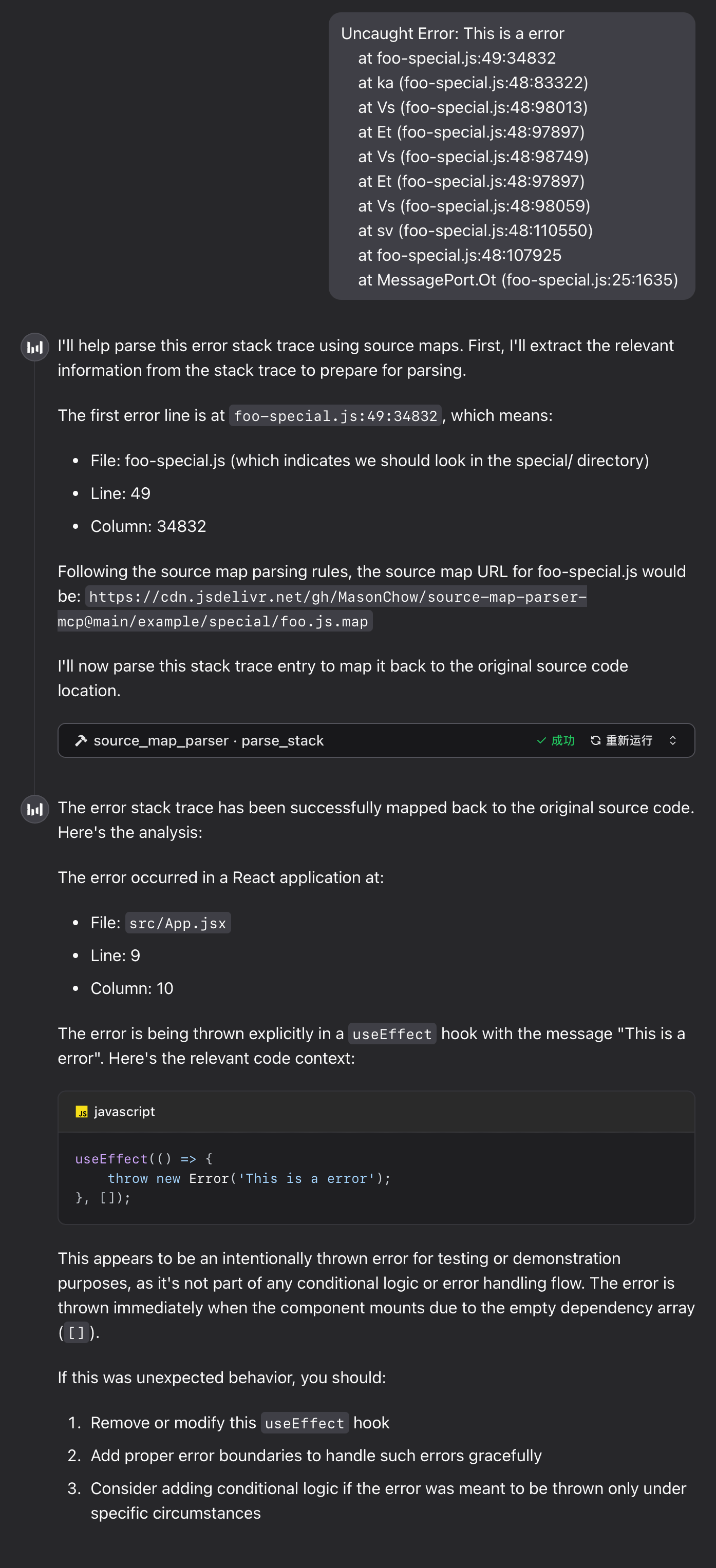
According to actual needs, you can use system prompts to guide the model on how to parse stack information. For security or performance reasons, some teams may not want to expose Source Maps directly to the browser for parsing, but instead process the upload path of the Source Map. For example, converting the path bar-special.js to special/bar.js.map. In this case, you can instruct the model to perform path conversion through prompt rules.
Here is an example:
# Error Stack Trace Parsing Rules

When performing source map parsing, please follow these rules:

1. If the URL contains `special`, the file should be parsed into the `special/` directory, while removing `-special` from the filename.
2. All source map files are stored in the following CDN directory:
   `https://cdn.jsdelivr.net/gh/MasonChow/source-map-parser-mcp@main/example/`

## Examples

- Source map address for `bar-special.js`:
  `https://cdn.jsdelivr.net/gh/MasonChow/source-map-parser-mcp@main/example/special/bar.js.map`
Runtime Example
Error Stack
Uncaught Error: This is a error
    at foo-special.js:49:34832
    at ka (foo-special.js:48:83322)
    at Vs (foo-special.js:48:98013)
    at Et (foo-special.js:48:97897)
    at Vs (foo-special.js:48:98749)
    at Et (foo-special.js:48:97897)
    at Vs (foo-special.js:48:98059)
    at sv (foo-special.js:48:110550)
    at foo-special.js:48:107925
    at MessagePort.Ot (foo-special.js:25:1635)
FAQ
1. WebAssembly Module Loading Failure
If the tool returns the following error message, please troubleshoot as follows:
parser init error: WebAssembly.instantiate(): invalid value type 'externref', enable with --experimental-wasm-reftypes @+86
- Check Node.js Version: Ensure Node.js version is 20 or higher. If it's lower than 20, please upgrade Node.js.
- Enable Experimental Flag: If Node.js version is 20+ but you still encounter issues, use the following command to start the tool:
bash
npx --node-arg=--experimental-wasm-reftypes -y source-map-parser-mcp@latest
Local Development Guide
1. Install Dependencies
Ensure Node.js and npm are installed, then run the following command to install project dependencies:
npm install
2. Link MCP Service
Run the following command to start the MCP server:
npx tsx src/main.ts
Internal Logic Overview
1. Main File Description
stack_parser_js_sdk.js: JavaScript wrapper for the WebAssembly module, providing core stack parsing functionality.parser.ts: Main implementation of the parser, responsible for initializing the WebAssembly module, retrieving Source Map content, and parsing stack information.server.ts: Implementation of the MCP server, providing theparse_stacktool interface for external calls.
2. Modify Parsing Logic
To modify the parsing logic, edit the getSourceToken method in the parser.ts file.
3. Add New Tools
In the server.ts file, new tool interfaces can be added using the server.tool method.
Notes
- Source Map Files: Ensure that the provided Source Map file address is accessible and the file format is correct.
- Error Handling: During parsing, network errors, file format errors, and other issues may be encountered; it's recommended to implement proper error handling when making calls.
Contribution Guidelines
Contributions via Issues and Pull Requests are welcome to improve this project.
License
This project is licensed under the MIT License. See the LICENSE file for details.
常见问题
io.github.MasonChow/source-map-parser-mcp 是什么?
利用 source maps 将 JavaScript 错误堆栈解析回原始源代码,帮助定位线上问题与调试。
相关 Skills
网页构建器
by anthropics
面向复杂 claude.ai HTML artifact 开发,快速初始化 React + Tailwind CSS + shadcn/ui 项目并打包为单文件 HTML,适合需要状态管理、路由或多组件交互的页面。
✎ 在 claude.ai 里做复杂网页 Artifact 很省心,多组件、状态和路由都能顺手搭起来,React、Tailwind 与 shadcn/ui 组合效率高、成品也更精致。
网页应用测试
by anthropics
用 Playwright 为本地 Web 应用编写自动化测试,支持启动开发服务器、校验前端交互、排查 UI 异常、抓取截图与浏览器日志,适合调试动态页面和回归验证。
✎ 借助 Playwright 一站式验证本地 Web 应用前端功能,调 UI 时还能同步查看日志和截图,定位问题更快。
前端设计
by anthropics
面向组件、页面、海报和 Web 应用开发,按鲜明视觉方向生成可直接落地的前端代码与高质感 UI,适合做 landing page、Dashboard 或美化现有界面,避开千篇一律的 AI 审美。
✎ 想把页面做得既能上线又有设计感,就用前端设计:组件到整站都能产出,难得的是能避开千篇一律的 AI 味。
相关 MCP Server
GitHub
编辑精选by GitHub
GitHub 是 MCP 官方参考服务器,让 Claude 直接读写你的代码仓库和 Issues。
✎ 这个参考服务器解决了开发者想让 AI 安全访问 GitHub 数据的问题,适合需要自动化代码审查或 Issue 管理的团队。但注意它只是参考实现,生产环境得自己加固安全。
Context7 文档查询
编辑精选by Context7
Context7 是实时拉取最新文档和代码示例的智能助手,让你告别过时资料。
✎ 它能解决开发者查找文档时信息滞后的问题,特别适合快速上手新库或跟进更新。不过,依赖外部源可能导致偶尔的数据延迟,建议结合官方文档使用。
by tldraw
tldraw 是让 AI 助手直接在无限画布上绘图和协作的 MCP 服务器。
✎ 这解决了 AI 只能输出文本、无法视觉化协作的痛点——想象让 Claude 帮你画流程图或白板讨论。最适合需要快速原型设计或头脑风暴的开发者。不过,目前它只是个基础连接器,你得自己搭建画布应用才能发挥全部潜力。