什么是 io.github.Codeturion/codesurface?
为代码库的公共 API 建立索引,并通过精简的 MCP 工具响应对外提供查询能力。
README
codesurface









MCP server that indexes your codebase's public API at startup and serves it via compact tool responses, saving tokens vs reading source files.
Parses source files, extracts public classes/methods/properties/fields/events, and serves them through 5 MCP tools. Works with Claude Code, Cursor, Windsurf, or any MCP-compatible AI tool.
Supported languages: C# (.cs), C++ headers (.h, .hpp, .hxx, .h++), Go (.go), Java (.java), Python (.py), TypeScript/JavaScript (.ts, .tsx, .js, .jsx)
Quick Start
Add to your .mcp.json:
{
  "mcpServers": {
    "codesurface": {
      "command": "uvx",
      "args": ["codesurface", "--project", "/path/to/your/src"]
    }
  }
}
Point --project at any directory containing supported source files (a Unity Assets/Scripts folder, a Spring Boot project, a .NET src/ tree, a Node.js/React project, a Python package, etc.). Languages are auto-detected.
Restart your AI tool and ask: "What methods does MyService have?"
CLAUDE.md Snippet
Add this to your project's CLAUDE.md (or equivalent instructions file). This step is important. Without it, the AI has the tools but won't know when to reach for them.
## Codebase API Lookup (codesurface MCP)

Use codesurface MCP tools BEFORE Grep, Glob, Read, or Task (subagents) for any class/method/field lookup. This applies to you AND any subagents you spawn.

| Tool | Use when | Example |
|------|----------|---------|
| `search` | Find APIs by keyword | `search("MergeService")` |
| `get_signature` | Need exact signature | `get_signature("TryMerge")` |
| `get_class` | See all members on a class | `get_class("BlastBoardModel")` |
| `get_stats` | Codebase overview | `get_stats()` |

Every result includes file path + line numbers. Use them for targeted reads:
- `File: Service.cs:32` → `Read("Service.cs", offset=32, limit=15)`
- `File: Converter.java:504-506` → `Read("Converter.java", offset=504, limit=10)`

Never read a full file when you have a line number. Only fall back to Grep/Read for implementation details (method bodies, control flow).
Tools
| Tool | Purpose | Example |
|---|---|---|
search | Find APIs by keyword | "MergeService", "BlastBoard", "GridCoord" |
get_signature | Exact signature by name or FQN | "TryMerge", "CampGame.Services.IMergeService.TryMerge" |
get_class | Full class reference card with all public members | "BlastBoardModel" → all methods/fields/properties |
get_stats | Overview of indexed codebase | File count, record counts, namespace breakdown |
reindex | Incremental index update (mtime-based) | Only re-parses changed/new/deleted files. Also runs automatically on query misses |
search, get_signature, and get_class accept two optional filters:
file_path: scope results to a directory prefix or exact file (e.g."src/services/"or"src/services/MergeService.ts")include_tests: include test files in results (defaultfalse). Detects__tests__/,tests/,test/,*.test.*,*.spec.*,*_test.*,test_*
Tested On
| Project | Language | Files | Records | Time |
|---|---|---|---|---|
| vscode | TypeScript | 6,611 | 88,293 | 9.3s |
| Paper | Java | 2,909 | 33,973 | 2.3s |
| client-go | Go | 219 | 2,760 | 0.4s |
| langchain | Python | 1,880 | 12,418 | 1.1s |
| pydantic | Python | 365 | 9,648 | 0.3s |
| guava | Java | 891 | 8,377 | 2.4s |
| immich | TypeScript | 919 | 7,957 | 0.6s |
| fastapi | Python | 881 | 5,713 | 0.5s |
| ant-design | TypeScript | 2,947 | 5,452 | 0.9s |
| dify | TypeScript | 4,903 | 5,038 | 1.9s |
| crawlee-python | Python | 386 | 2,473 | 0.3s |
| flask | Python | 63 | 872 | <0.1s |
| cobra | Go | 15 | 249 | <0.1s |
| gin | Go | 41 | 574 | <0.1s |
| Unity game (private) | C# | 129 | 1,018 | 0.1s |
Line Numbers for Targeted Reads
Every record includes line_start and line_end (1-indexed). Multi-line declarations span the full signature:
[METHOD] com.google.common.base.Converter.from
  Signature: static Converter<A, B> from(Function<...> forward, Function<...> backward)
  File: Converter.java:504-506          ← multi-line signature

[METHOD] server.AlbumController.createAlbum
  Signature: createAlbum(@Auth() auth: AuthDto, @Body() dto: CreateAlbumDto)
  File: album.controller.ts:46          ← single-line
This lets AI agents do targeted reads instead of reading full files:
# Instead of reading the entire 600-line file:
Read("Converter.java")                     # 600 lines, ~12k tokens

# Read just the method + context:
Read("Converter.java", offset=504, limit=10)  # 10 lines, ~200 tokens
Benchmarks
Measured across 5 real-world projects in 5 languages, each using a 10-step cross-cutting research workflow.
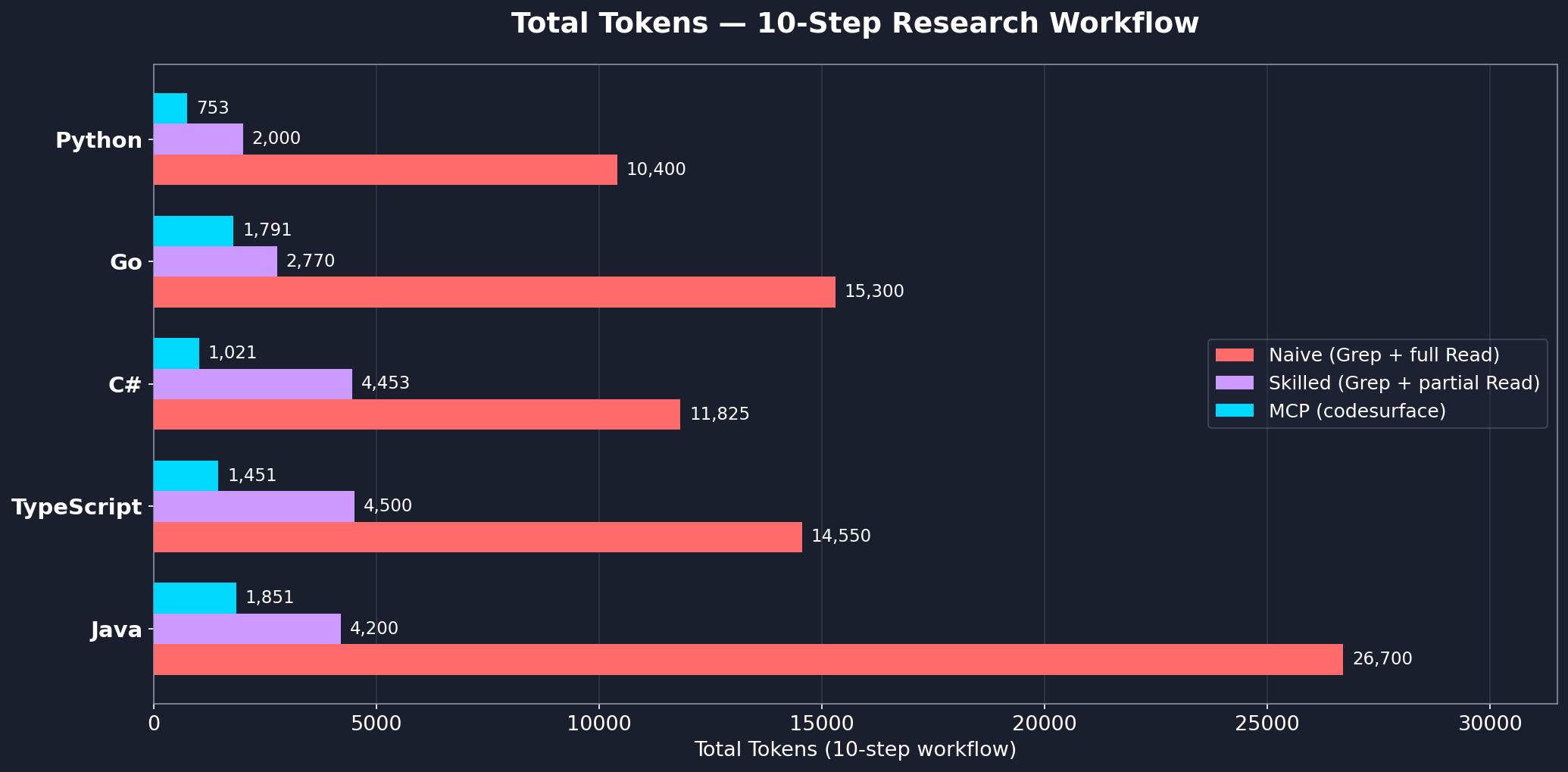
| Language | Project | Files | Records | MCP | Skilled | Naive | MCP vs Skilled |
|---|---|---|---|---|---|---|---|
| C# | Unity game | 129 | 1,034 | 1,021 | 4,453 | 11,825 | 77% fewer |
| TypeScript | immich | 694 | 8,344 | 1,451 | 4,500 | 14,550 | 68% fewer |
| Java | guava | 891 | 8,377 | 1,851 | 4,200 | 26,700 | 56% fewer |
| Go | gin | 38 | 534 | 1,791 | 2,770 | 15,300 | 35% fewer |
| Python | codesurface | 9 | 40 | 753 | 2,000 | 10,400 | 62% fewer |
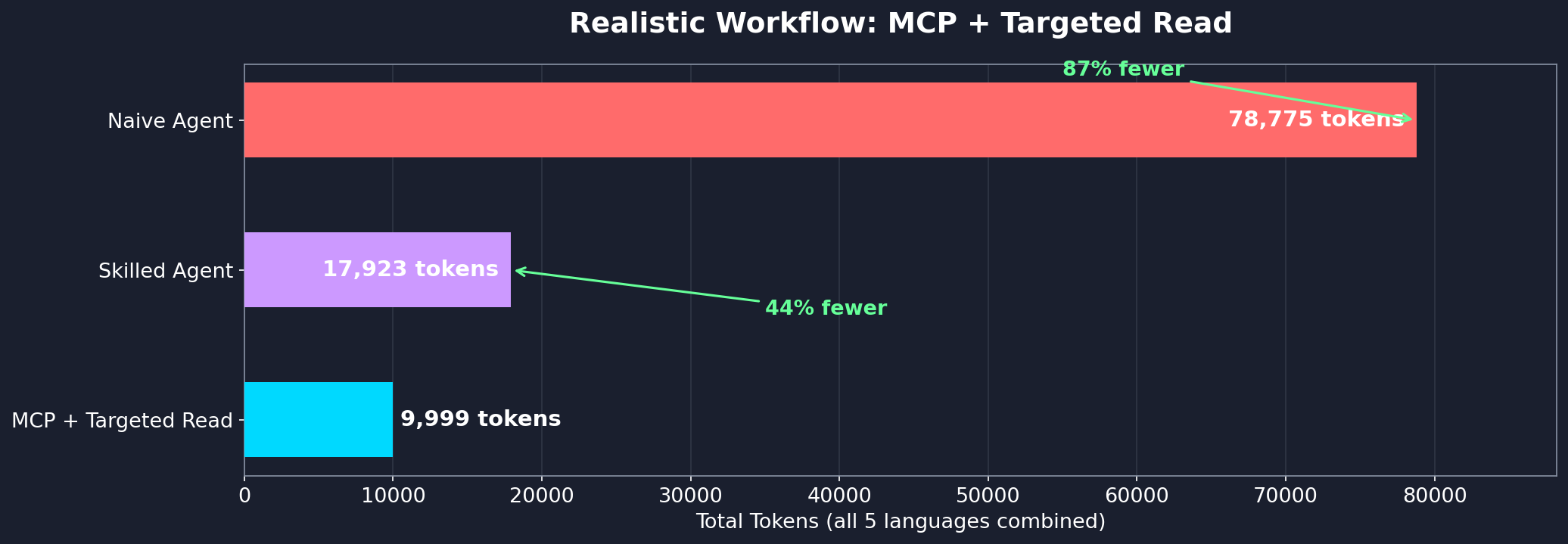
Even with follow-up reads for implementation detail, the hybrid MCP + targeted Read approach uses 44% fewer tokens than a skilled Grep+Read agent and 87% fewer than a naive agent:
Per-question breakdown
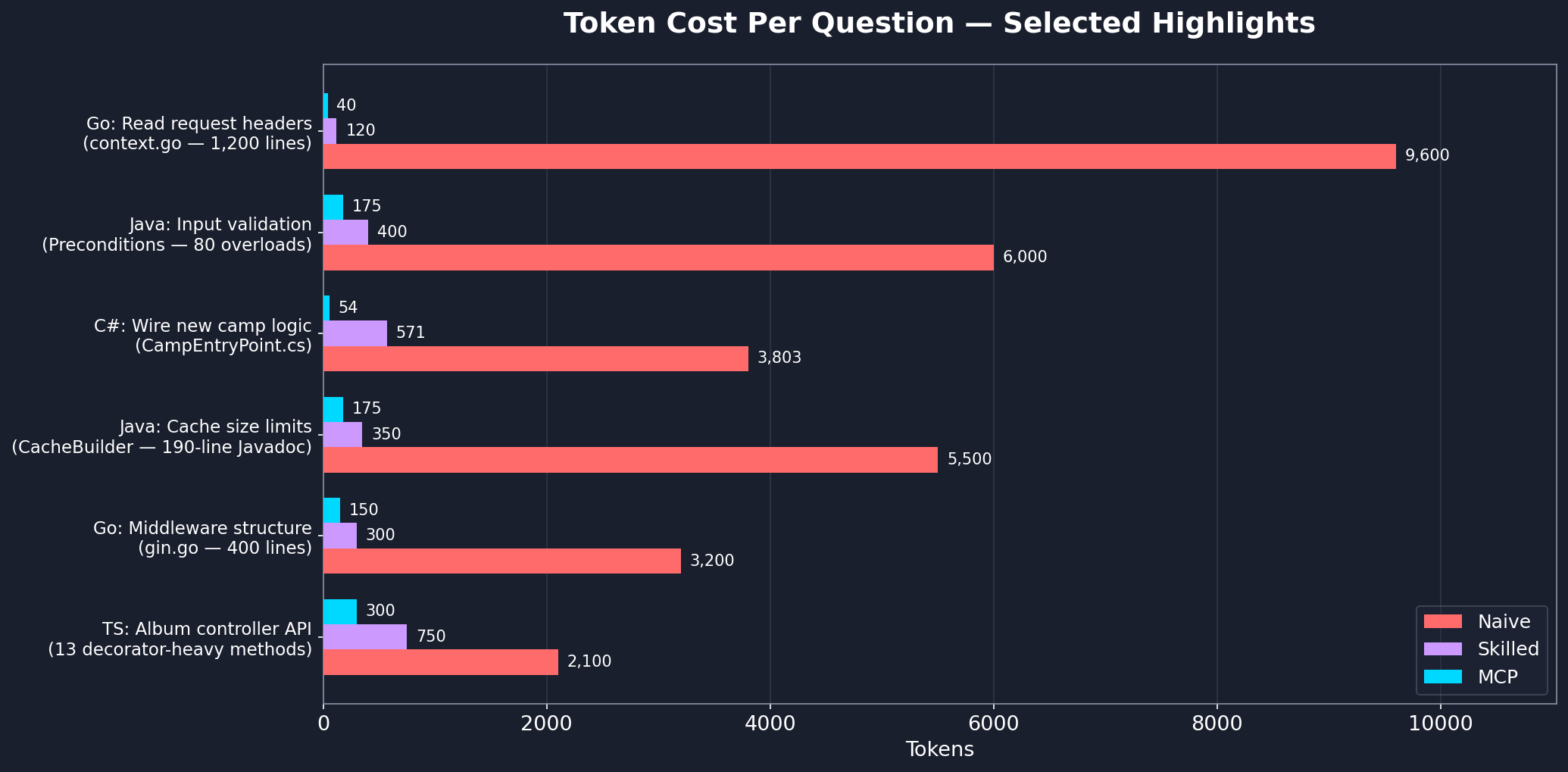
See workflow-benchmark.md for the full step-by-step analysis across all languages.
Filtering What Gets Indexed
By default, codesurface skips common vendored, build, and VCS directories: node_modules, vendor, bin, obj, dist, build, target, .git, .venv, __pycache__, and a few dozen others. Git worktrees and submodules are also skipped.
To exclude additional paths:
Project-level (committed): create a .codesurfaceignore file at your project root with one glob per line.
generated/**
docs/**
**/*.pb.go
Per-instance (CLI): pass --exclude with comma-separated globs.
{
  "command": "uvx",
  "args": ["codesurface", "--project", "src", "--exclude", "generated/**,vendor/**"]
}
Other indexing flags:
--include-submodules: index git submodules (skipped by default)--language <name>: pin to a single parser (e.g.--language cpp) instead of auto-detecting
Multiple Projects
Each --project flag indexes one directory. To index multiple codebases, run separate instances with different server names:
{
  "mcpServers": {
    "codesurface-backend": {
      "command": "uvx",
      "args": ["codesurface", "--project", "/path/to/backend/src"]
    },
    "codesurface-frontend": {
      "command": "uvx",
      "args": ["codesurface", "--project", "/path/to/frontend/src"]
    }
  }
}
Each instance gets its own in-memory index and tools. The AI agent sees both and can query across projects.
Setup Details
<details> <summary>Alternative installation methods</summary>Using pip install:
pip install codesurface
{
  "mcpServers": {
    "codesurface": {
      "command": "codesurface",
      "args": ["--project", "/path/to/your/src"]
    }
  }
}
codesurface/
├── src/codesurface/
│   ├── server.py           # MCP server with 5 tools
│   ├── db.py               # SQLite + FTS5 database layer
│   ├── filters.py          # PathFilter (default exclusions, .codesurfaceignore, --exclude)
│   └── parsers/
│       ├── base.py         # BaseParser ABC
│       ├── cpp.py          # C++ header parser
│       ├── csharp.py       # C# parser
│       ├── go.py           # Go parser
│       ├── java.py         # Java parser
│       ├── python_parser.py # Python parser
│       └── typescript.py   # TypeScript/JavaScript parser
├── pyproject.toml
└── README.md
"No codebase indexed"
- Ensure
--projectpoints to a directory containing supported source files (.cs,.h,.hpp,.go,.java,.py,.ts,.tsx,.js,.jsx) - The server indexes at startup. Check stderr for
[codesurface] scanning N files...and[codesurface] done:lines
Server won't start
- Check Python version:
python --version(needs 3.10+) - Check
mcp[cli]is installed:pip install mcp[cli]
Stale results after editing source files
- The index auto-refreshes on query misses. If you add a new class and query it, the server reindexes and retries automatically
- You can also call
reindex()manually to force an incremental update
Contact
License
常见问题
io.github.Codeturion/codesurface 是什么?
为代码库的公共 API 建立索引,并通过精简的 MCP 工具响应对外提供查询能力。
相关 Skills
网页构建器
by anthropics
面向复杂 claude.ai HTML artifact 开发,快速初始化 React + Tailwind CSS + shadcn/ui 项目并打包为单文件 HTML,适合需要状态管理、路由或多组件交互的页面。
✎ 在 claude.ai 里做复杂网页 Artifact 很省心,多组件、状态和路由都能顺手搭起来,React、Tailwind 与 shadcn/ui 组合效率高、成品也更精致。
网页应用测试
by anthropics
用 Playwright 为本地 Web 应用编写自动化测试,支持启动开发服务器、校验前端交互、排查 UI 异常、抓取截图与浏览器日志,适合调试动态页面和回归验证。
✎ 借助 Playwright 一站式验证本地 Web 应用前端功能,调 UI 时还能同步查看日志和截图,定位问题更快。
前端设计
by anthropics
面向组件、页面、海报和 Web 应用开发,按鲜明视觉方向生成可直接落地的前端代码与高质感 UI,适合做 landing page、Dashboard 或美化现有界面,避开千篇一律的 AI 审美。
✎ 想把页面做得既能上线又有设计感,就用前端设计:组件到整站都能产出,难得的是能避开千篇一律的 AI 味。
相关 MCP Server
GitHub
编辑精选by GitHub
GitHub 是 MCP 官方参考服务器,让 Claude 直接读写你的代码仓库和 Issues。
✎ 这个参考服务器解决了开发者想让 AI 安全访问 GitHub 数据的问题,适合需要自动化代码审查或 Issue 管理的团队。但注意它只是参考实现,生产环境得自己加固安全。
Context7 文档查询
编辑精选by Context7
Context7 是实时拉取最新文档和代码示例的智能助手,让你告别过时资料。
✎ 它能解决开发者查找文档时信息滞后的问题,特别适合快速上手新库或跟进更新。不过,依赖外部源可能导致偶尔的数据延迟,建议结合官方文档使用。
by tldraw
tldraw 是让 AI 助手直接在无限画布上绘图和协作的 MCP 服务器。
✎ 这解决了 AI 只能输出文本、无法视觉化协作的痛点——想象让 Claude 帮你画流程图或白板讨论。最适合需要快速原型设计或头脑风暴的开发者。不过,目前它只是个基础连接器,你得自己搭建画布应用才能发挥全部潜力。