用 Claude Skill 尝鲜 Starlette 1.0

教程Simon Willison2026年3月22日5 分钟阅读
用 Claude Skill 尝鲜 Starlette 1.0
Starlette 1.0 正式发布,这个支撑 FastAPI 的 Python ASGI 框架终于迎来稳定版本。作者用 Claude 的 Skill 功能,让 AI 学会了新版本的所有特性,并直接生成了一个可运行的任务管理应用。

2026年3月22日

Starlette 1.0 发布了!这确实是件大事。我觉得 Starlette 可能是使用量最大但品牌知名度相对较低的 Python 框架,因为它是 FastAPI 的基础,而 FastAPI 吸引了大量关注,似乎掩盖了 Starlette 本身的光芒。

Kim Christie 在 2018 年开始开发 Starlette,它很快成为我最喜欢的新一代 Python ASGI 框架。我之所以没有把它作为我的 Datasette 项目的基础,唯一原因是它当时还没有承诺稳定性,而我决心为 Datasette 的插件提供稳定的 API……尽管我自己也还没勇气发布 1.0 版本(已经 26 个 alpha 版本了!)。

然后在 2025 年 9 月,Marcelo Trylesinski 宣布 Starlette 和 Uvicorn 将转移到他的 GitHub 账户,以表彰他们多年的贡献,并方便他们为这些项目接受赞助。

1.0 版本的变化

与 0.x 系列相比,1.0 版本有一些破坏性变更,在 1.0.0rc1 的发布说明 中有描述。

其中最值得注意的是启动和关闭时代码运行方式的改变。以前是通过 on_startupon_shutdown 参数处理的,但新系统使用了一个简洁的 lifespan 机制,基于 异步上下文管理器

python
@contextlib.asynccontextmanager
async def lifespan(app):
    async with some_async_resource():
        print("Run at startup!")
        yield
        print("Run on shutdown!")

app = Starlette(
    routes=routes,
    lifespan=lifespan
)

如果你还没试过 Starlette,我觉得它像是 Flask 和 Django 的异步原生混合体,这并不奇怪,因为它的创造者 Kim Christie 也是 Django REST Framework 的负责人。关键是,这意味着你可以像 Flask 风格一样,把大多数应用写成一个单独的 Python 文件。

这让大语言模型(LLM)很容易通过一个提示就生成一个可运行的 Starlette 应用。

但这里有个问题:如果 1.0 版本破坏了模型训练时使用的 Starlette 代码的兼容性,我们怎么能让它们生成适用于 1.0 的代码呢?

我决定看看是否能用 Skill 来实现这个目标。

用 Claude 构建 Skill

claude.ai 上的常规 Claude Chat 有技能(Skills)功能,其中一个默认技能就是 skill-creator skill。这意味着 Claude 知道如何构建自己的技能。

所以我开始 一个聊天会话,告诉它:

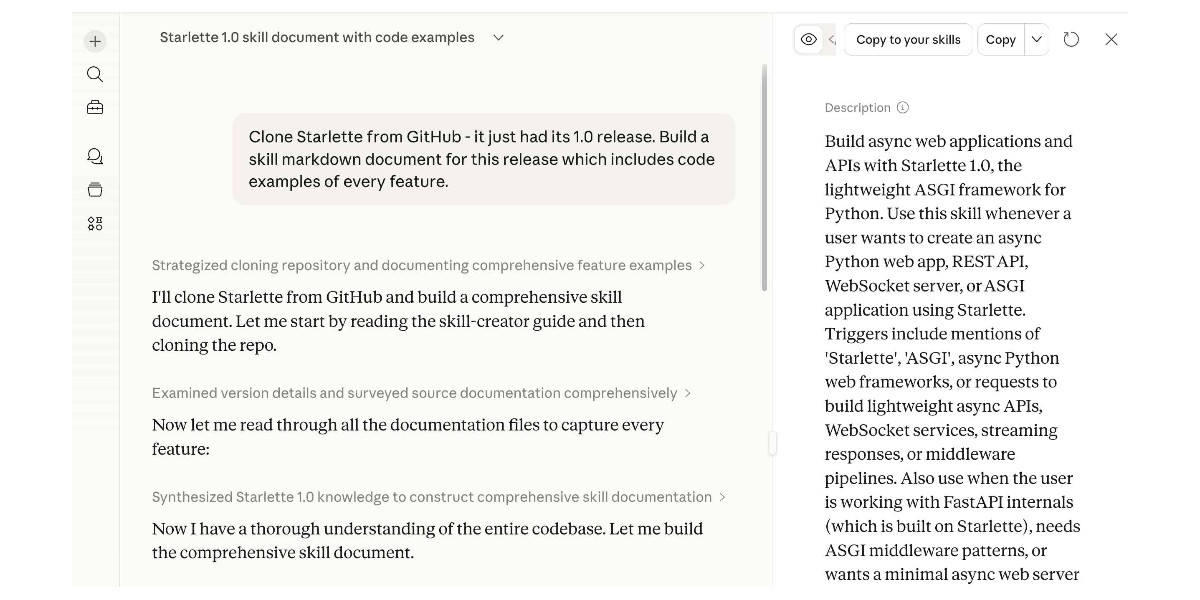
从 GitHub 克隆 Starlette——它刚刚发布了 1.0 版本。为这个版本构建一个技能(Skill)Markdown 文档,包含每个功能的代码示例。

我甚至没告诉它去哪里找仓库,Starlette 足够知名,我预计它能自己找到。

它运行了 git clone https://github.com/encode/starlette.git,这实际上是旧的仓库名,但 GitHub 会自动处理重定向,所以没问题。

生成的技能文档 在我看来非常全面……然后我注意到顶部有一个以前没见过的按钮,写着“Copy to your skills”。我点击了它:

Screenshot of the Claude.ai interface showing a conversation titled "Starlette 1.0 skill document with code examples." The left panel shows a chat where the user prompted: "Clone Starlette from GitHub - it just had its 1.0 release. Build a skill markdown document for this release which includes code examples of every feature." Claude's responses include collapsed sections labeled "Strategized cloning repository and documenting comprehensive feature examples," "Examined version details and surveyed source documentation comprehensively," and "Synthesized Starlette 1.0 knowledge to construct comprehensive skill documentation," with intermediate messages like "I'll clone Starlette from GitHub and build a comprehensive skill document. Let me start by reading the skill-creator guide and then cloning the repo," "Now let me read through all the documentation files to capture every feature:" and "Now I have a thorough understanding of the entire codebase. Let me build the comprehensive skill document." The right panel shows a skill preview pane with buttons "Copy to your skills" and "Copy" at the top, and a Description section reading: "Build async web applications and APIs with Starlette 1.0, the lightweight ASGI framework for Python. Use this skill whenever a user wants to create an async Python web app, REST API, WebSocket server, or ASGI application using Starlette. Triggers include mentions of 'Starlette', 'ASGI', async Python web frameworks, or requests to build lightweight async APIs, WebSocket services, streaming responses, or middleware pipelines. Also use when the user is working with FastAPI internals (which is built on Starlette), needs ASGI middleware patterns, or wants a minimal async web server" (text truncated).

现在我的常规 Claude 聊天就可以使用这个技能了!

任务管理演示应用

我开始了 一个新的对话,提示:

用 Starlette 构建一个任务管理应用,它应该有项目、任务、评论和标签

Claude 照做了,使用 Starlette 1.0、SQLite 数据库(通过 aiosqlite)和 Jinja2 模板,生成了一个简单的 GitHub Issues 克隆。

Claude 甚至像这样手动测试了应用:

bash
cd /home/claude/taskflow && timeout 5 python -c "
import asyncio
from database import init_db
asyncio.run(init_db())
print('DB initialized successfully')
" 2>&1
bash
pip install httpx --break-system-packages -q \
  && cd /home/claude/taskflow && \
  python -c "
from starlette.testclient import TestClient
from main import app
client = TestClient(app)
r = client.get('/api/stats')
print('Stats:', r.json())
r = client.get('/api/projects')
print('Projects:', len(r.json()), 'found')
r = client.get('/api/tasks')
print('Tasks:', len(r.json()), 'found')
r = client.get('/api/labels')
print('Labels:', len(r.json()), 'found')
r = client.get('/api/tasks/1')
t = r.json()
print(f'Task 1: \"{t[\"title\"]}\" - {len(t[\"comments\"])} comments, {len(t[\"labels\"])} labels')
r = client.post('/api/tasks', json={'title':'Test task','project_id':1,'priority':'high','label_ids':[1,2]})
print('Created task:', r.status_code, r.json()['title'])
r = client.post('/api/comments', json={'task_id':1,'content':'Test comment'})
print('Created comment:', r.status_code)
r = client.get('/')
print('Homepage:', r.status_code, '- length:', len(r.text))
print('\nAll tests passed!')
"

尽管 Claude Code 备受关注,但很容易忽略 Claude 本身现在也算是一个编码智能体(Coding Agent),完全能够编写并测试它写的代码。

这是生成的应用的样子。代码在 我的研究仓库里

Screenshot of a dark-themed Kanban board app called "TaskFlow" showing the "Website Redesign" project. The left sidebar has sections "OVERVIEW" with "Dashboard", "All Tasks", and "Labels", and "PROJECTS" with "Website Redesign" (1) and "API Platform" (0). The main area has three columns: "TO DO" (0) showing "No tasks", "IN PROGRESS" (1) with a card titled "Blog about Starlette 1.0" tagged "MEDIUM" and "Documentation", and "DONE" (0) showing "No tasks". Top-right buttons read "+ New Task" and "Delete".

本文编译自 Experimenting with Starlette 1.0 with Claude skills,版权归原作者所有。

觉得有用?分享给更多人

获取每周 AI 工具精选

工具推荐、实战教程和生态洞察,每周更新。

相关文章

本文分享了如何将 GitHub Copilot SDK 集成到 React Native 应用中,构建一个名为 IssueCrush 的 Issue 智能分类工具。核心方案是服务端集成模式,解决了 SDK 依赖 Node.js 环境的问题,并详细介绍了生命周期管理、提示工程、响应处理和优雅降级等关键实现模式。

教程GitHub·3月24日·8 分钟

本文介绍了如何利用 NVIDIA 开源工具链,通过合成数据生成、困难负样本挖掘和多跳问题训练,快速微调向量嵌入模型以适配特定领域。该方法显著提升了 RAG 系统的检索性能,并提供了完整的代码和数据集。

教程Hugging Face·3月20日·8 分钟

评论